



When the router is in Full Eco standby mode, the 2.4 and 5 GHz wifi lights are off, and the power light turns off for 1 second every 4 seconds, as shown in the animation below.
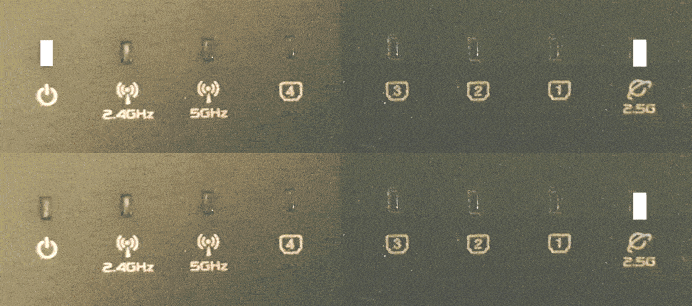
If this does not happen, the router is not in Full Eco standby mode. There are a number of possible causes for this:
There are devices connected to the wifi
In the router’s settings menu, on the Eco 100 Wifi -> Registered Devices page, you can see which devices are keeping the router’s wifi active. These are the devices with ‘Connected now’ next to them. To put the router into standby/sleep mode, you need to turn off the wifi on these devices. Even if your wireless devices are not connected but their Wi-Fi is still on, they can still send connection requests that keep the router awake.
Location Services
You may need to disable the ‘improve location accuracy’ setting on your wireless device or disable location services altogether. If the setting is enabled, your device will continue to broadcast wifi scans even when wifi is turned off!
The router is still in Learning Mode
After you have installed the Eco 100 Era router, it first enters Learning Mode. The lights on the router then flash as shown in the animation below.
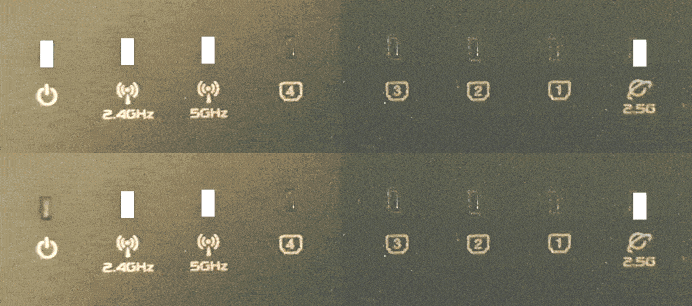
To recognize which devices belong to you, the router keeps a list of devices that you have previously connected to the router: the registration list. Then, if no new wifi devices are added to the registration list within 24 hours, the router automatically switches permanently to Full Eco mode, in which it is completely radiation-free when no devices are connected to the wifi. If you wish, you can skip the learning mode via the settings menu on the Eco 100 Wifi -> Pro Settings page.