



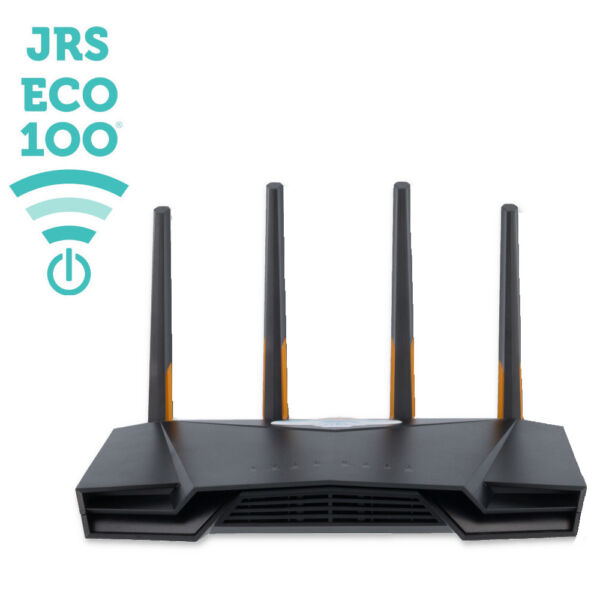
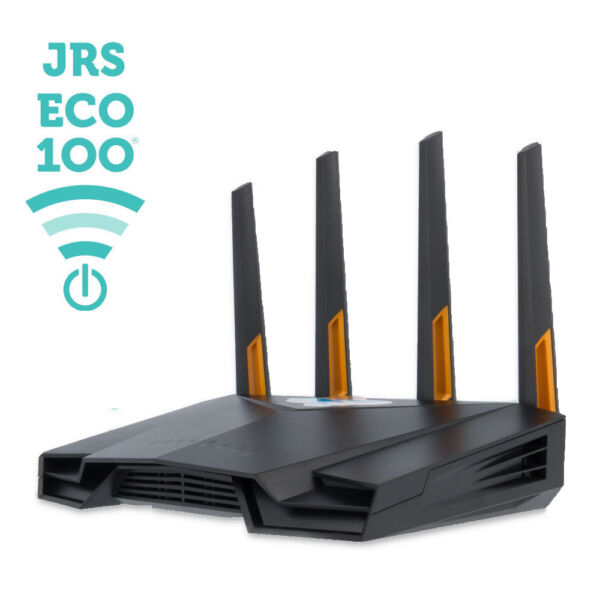
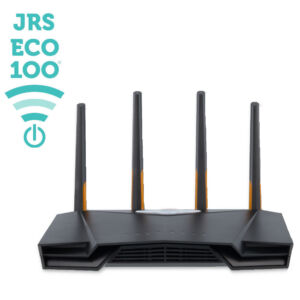
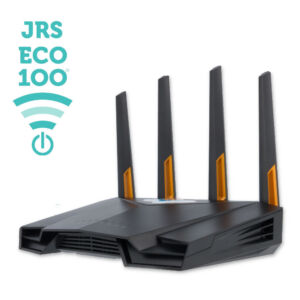
JRS Eco 100 Era – Low EMF WiFi Router on Asus
$322.47
The Era features AX4200 WiFi speeds and is supplied with a grounded power adapter.
- Description
- Details
- Reviews (220)
- Product support
Description
WiFi routers and modems put out radiation 24 hours a day, even when you are not using the Internet. They broadcast so-called beacon signals with the name of the network, 10 times a second. So the biggest 24-hour EMF emitter is in your own home. With this low radiation wireless router from JRS Eco you can reduce electromagnetic radiation in your home, measurably. These routers are equipped with JRS Eco firmware, an operating system that reduces emissions and works on a modern Asus® router. The patented Full Eco technology is fully integrated into the unique software, developed in-house by JRS Eco, the original inventor of Eco-WiFi since 2011. JRS routers are compatible with every Internet provider. Simply use the included ethernet cable to plug the JRS router into your modem.
Features
- Cuts down on electrosmog by reducing the beacon pulse frequency by 87%.
- Precise transmission power adjustment: set the exact range you need and no more. JRS Eco 100 routers offer the lowest possible emission in the market, measurably so. How much radiation does the JRS Eco 100 WiFi router emit compared to an ordinary router? EMF measurements and range.
- Full Eco: When no WiFi devices are connected, the JRS Eco 100 router automatically switches to the 100% radiation free mode. When you re-enable WiFi on your device, the router instantly switches its WiFi signal back on.
- Can be used as a wireless Eco 100 Repeater with unique propagation effect for zero-emission standby.
- WiFi on/off button and scheduler.
This functionality does not come at the expense of speed, stability or range compared to ordinary WiFi routers.
Highlights of the JRS Eco 100 Era
The latest JRS Eco 100 router is better than ever. Its ultra-high speed helps you keep up with this ‘Era’ of quickening.
- Seamless installation and device connection: Scan the code on the bottom of the router to connect your devices with a single click, ensuring they can wake the Eco-router from sleep mode.
- Convenient Eco settings menu: Access all Eco 100 functionality at a glance, with a user-friendly interface.
- Precision WiFi range control: Adjust the WiFi signal range to your liking with a convenient slider.
- AX4200 WiFi speed and 2.5 Gbps Internet port: For ultra-fast connections.
- Indication LEDs: Easily see when Eco mode is active through the lights on the router.
- WPA3 security: For a safe WiFi connection.
- With grounded power supply and plug.
Additional features
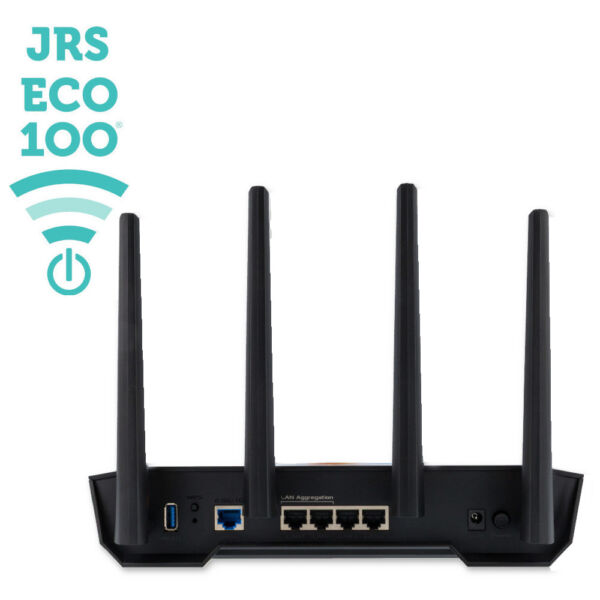
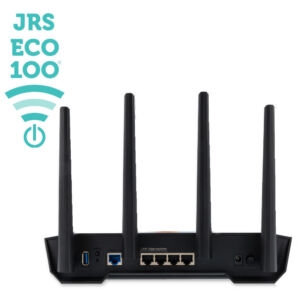
- 4x Gigabit Ethernet LAN ports: For fast and reliable hardwired connections.
- VPN Capability: For a secured connection and for privacy. WireGuard and OpenVPN compatible.
- USB 3 Port: For sharing files or using a USB printer server.
- Ready To Go: Comes with JRS Eco 100 firmware installed.
- Open-source based JRS firmware: With automatic security updates.
- No need to reconfigure or start from scratch: All Eco functionality remains on the router even if you reset it.
- Compatible with wireless doorbells and security systems: The router will still feature an 87% reduction in beacon pulse rate.
- 2-year Warranty.
The router comes with a universal power adapter, compatible with US and worldwide voltages and frequencies. Fast and reliable shipping.


See also: What are the differences between the models?
| JRS Eco 100 Era - Low EMF WiFi Router on Asus | |
| Full Eco Zero Emission stand-by mode | |
| 87% reduced beacon pulse frequency | |
| Fine adjustment of range with 1 milliwatt step size | |
| WiFi time scheduler - Set times when WiFi automatically switches off 100%, e.g. at night | |
| On/off button for WiFi transmitter - cabled LAN ports keep functioning | |
| Firewall and WPA2/WPA3-security | (WPA3) |
| Receives automatic security updates | |
| Supports creation of guest WiFi networks | |
| MiniDLNA media server | |
| WiFi speed on 2.4 GHz | 600 Mbps (802.11ax) |
| WiFi speed on 5 GHz | 3600 Mbps (802.11ax) |
| Internet / WAN port | 2500 Mbps |
| Ethernet LAN ports | 4x 1000 Mbps |
| USB ports for network drive or USB printer | 1x USB 3 |
| Grounded power supply adapter | |
| VPN client support | WireGuard OpenVPN |
| Supports 4G/5G mobile broadband USB dongles/sticks | |
| Supports installation of custom apps/packages | |
| Based on | Asus TUF-AX4200 |
| Suitable for wall mounting | |
| Dimensions (in) | 10.4 x 7.0 x 7.3 |
Easy installation. The Eco-WiFi router is connected to your internet modem using a standard network cable (included). If your internet modem has built-in Wifi, switch off its Wifi function. You may ask your internet provider’s customer service how. All functions of your existing internet modem, like for example internet telephony, can still be used.
The exposure to EM radiation from the laptop or other wirelessly connected equipment remains unchanged. Set your smartphone to switch its wifi off in stand-by mode. In some cases you can reduce the transmit power of your computer’s WiFi adapter using the Device Manager in Windows. A wired internet connection is radiation-free and minimizes health risk.
220 reviews for JRS Eco 100 Low Radiation WiFi Routers
Show reviews in all languages (609)

Robert Lewis Sabino –
I was unable to hook up the JRS ECO wireless due to compatibility issues with my current T Mobile router. Jan was very patient and helpful getting the JRS unit operational, but due to T mobile difficulty, I will follow Jan’s direction to minimize the 5G aspect. Overall, very good help from JAN.
Thanks,
Rob
Lahary Cathelyne (verified owner) –
The person who guided us through reactivating the JRS Eco 100 was incredibly patient in helping us resolve the issue. He even went above and beyond, allowing us to check other settings that would help reduce interference with other networks… and so on.
He spent an hour and a half with us on the phone until everything was completely sorted out.
Thank you so very much.
I’m the “hyper-electrosensitive” person in the house. It was for my sake that we invested in the JRS Eco 100. It’s been a month since we got it, and I can really tell the difference. I would absolutely recommend this purchase. I realize its effect in hindsight when I visit friends who have Wi-Fi—my body goes haywire again—whereas at home, with the JRS Eco 100, my body can gradually calm down and rest. I’m completely satisfied with the investment, and I thank its designers.
Elizabeth Wetherbee (Eco 100 Era model) (verified owner) –
I have been wanting one of these routers for about 10 years and I finally made the purchase. I had some trouble with set up, and after a few helpful emails and a phone call, Jan was able to patiently and kindly help me figure out how to get things up and running. I am very sensitive to EMFs and previously would have to unplug my wifi at night. With the Jrs router, I no longer get a weird electric feeling through my body when I am near the router or when using devices. I am so thankful for this company and would recommend this router to everyone.
James Turner (Eco 100 Era model) –
Great customer service!
Marianne (Eco 100 Era model) (verified owner) –
Very helpful with the setup, and the explanation was great—thank you so much!!!
Chris (Eco 100 Era model) –
I had no trouble setting up the router, and so far it seems to be working great and we no longer even need our mesh router system that was on all the time spreading EMF throughout the house. This was recommended to us by our contractor who did an EMF survey of our house as one of the things we could do to reduce our exposures. So far so good!
Edric (Eco 100 Era model) (verified owner) –
I am very happy with the JRS Eco 100 router. It works exactly like a regular router and is faster than the previous eco router. Further, the customer support is excellent! I had issues with installation (which I now know was due to my internet provider and not the router), and Dr. Schrader was extremely helpful and replied promptly throughout the process. This is a company that stands behind their products and cares for the health of their customers. I highly recommend you purchase this router for you and your loved ones!
Stéphane Tessier (Eco 100 Era model) (verified owner) –
Please note that the router is really quite bulky (JRS Eco 100 Era), which is a bit of a shame since the goal is clearly not to have a long range or high performance…
JRS Eco Wireless –
For a compact model with the same technical specifications, see our Eos model.
Sara (Eco 100 D1 model) (verified owner) –
Extremely happy with this product. It took a little time to work it out and realize just how many devices are connecting to Wi-Fi! the automatic on and off element is so very handy. Highly recommend this product is you are looking to turn off your Wi-Fi at night or any time you are not using it for that matter!
Troy (Eco 100 D1 model) –
Wifi EMF was affecting my brain and vision plus more migraines. JRS works great. When I need wifi I go to another room away from my router. As soon as I turn on a device wifi the router activates wifi and the device quickly connects. I get done what I need to and after turning off the device wifi it only takes a few seconds and the router deactivates wifi. I highly recommend JRS for anyone wanting to reduce wifi EMF.
David N (Eco 100 D1 model) (verified owner) –
Initial setup was a breeze, worked perfectly with our newly installed Fiber ISP (Israel) right off the bat as well.
I was able to control WiFI transmission strength, schedule WiFi ON/OFF for night time (I tweaked it to lowest setting that worked for us and the reception is strong).
Minor issue with random disconnections as it supposedly kept switching over to daylight saving time (automatically according to my region), which I Solved by manually setting the clock back 1 hour, scheduled the ON/OFF times accordingly and voila works like a charm again. (could be an ASUS thing, not sure.)
Overall, a genius product I 100% would recommend.
Sarah Rohan (Eco 100 D1 model) –
I am very electrically sensitive. We learned which items in our home were making my head hurt so badly when we hired someone to test our home for electromagnetic frequency (EMF). Our old computer router was putting off terrible EMF. Our new JRS Eco Router is wonderful! We push a little button on it to turn off the Wi-Fi, and it doesn’t hurt my head at all. I’m so grateful there are people out there who are trying to help people like me!
Lori Rodriguez (Eco 100 D1 model) (verified owner) –
For years now, I have been searching for ways to reduce EMF in my home. An EMF detection technician I am working with recommended this router and I love it. The instructions were easy to follow (even for a non-tech savvy person like me) and the customer service is very helpful and responsiveI I also like how I can adjust the router as I like with regard to strength of signal, wifi shutoff, etc. I was having issues like headaches and a feeling of stress/anxiety in my body, but I feel a lot better since using the Eco 100 router!
GianC (Eco 100 D1 model) (verified owner) –
Thus far, we are extremely satisfied with this router. It gives us the ability to eliminate Wifi, but activate Wifi temporarily if needed. 99%+ of the time we have the Wifi turned off, but if there is something that comes up, like an update on a work phone that will only work with Wifi on, then we will turn it on momentarily.
Overall, for the first couple of months, it has served our family very well.
Grahame Gardner (Eco 100 D1 model) (verified owner) –
This is a follow-up to my previous review where I indicated an issue where the router would occasionally drop connection with the BT Smart Hub around once a month or so, which was an inconvenience when I was away from home and couldn’t access my NAS.
An email to JRS produced a very quick response, suggesting that I simply program the JRS router to do a reboot every day at a suitable time when not in use. I programmed it to reset itself every morning at 5am and I haven’t had any problems since.
I regularly endorse this product with my customers, it is a perfect solution for retaining Wi-Fi capability ‘on demand’.
Ales Vanek (Eco 100 D1 model) (verified owner) –
This has been a life-saver for me!!
I beleive that my old WiFi router was too strong and the WiFi signal was actually causing some discomfort in some of my inner organs – I know that sounds very wierd, but that’s what I concluded after many, many observations. I’ve switched to JRS Eco Wireless and also connected my laptops to LAN cables in my home offices (using MoCa over Coax…) so I also limited the radionton from my PC.
Since then, the discomfort has completely vanished, and my sleep has improved dramatically. I can absolutely recommend this device!
Doug Miller (Eco 100 D1 model) –
This router is awesome! I wasn’t sure about installation, especially after viewing various YouTube videos. So I contacted Jan through the email listed, set up a time for consult, then I my router installed. Easy-peasy. Thanks, Jan, for the help. Everything is perfect!
Nicole Bijlsma (Eco 100 D1 model) (verified owner) –
Im having difficulty turning off the Wi-Fi component, so it is just hard wired
Claude (Eco 100 D1 model) –
Very nice router. Easy install and we get good coverage when the wireless is on. Router rinsing about 400mps download and 15mps upload so speed is fine. I like the wireless on/off feature. We have a young grandson at home sometimes and we turn off the wireless when he is here but we also have wired connections so it works out fine. I don’t know about software updates but they are typically automatic with the newer routers. The router is a little expensive but it’s worth the added cost if you are concerned about managing EMF exposure in the house. We are satisfied with our purchase
Ursula Compton (Eco 100 D1 model) (verified owner) –
This router replaced an existing ASUS router with AT&T, which meant I had to turn off Wifi on the modem. I checked with an EMF meter to make sure the EMF and RF frequencies are reduced. I also have my router and modem in a Faraday cage. Installation was easy. I also replaced 90% of my Wifi usage with Ethernet cables and I use a timer to turn off modem and router at night to reduce EMF exposure further. Unfortunately, Sonos uses Wifi when in use and I could not turn off Wifi completely, so the router won’t be able to turn off Wifi mode completely during the day, but I am very happy with my purchase.
Eleanor Hatherley (Eco 100 D1 model) (verified owner) –
JRS Eco feels like a lifesaver to me. I really don’t trust all this radiation as it’s not been researched long term (humans live 80+ years so we won’t know for sure until we’ve seen the effects for a whole life span). I’ve always had the wifi on my modem disabled and I use ethernet cables. But my daughter needs wifi sometimes so I wanted a modem where I could easily turn the wifi on and off. The JRS Eco modem is perfect for this. And even when the wifi is on, the radiation levels are so much lower than with a standard modem. It was easy to set up and JRS Eco are really good at helping with any technical difficulties, replying very quickly every time. My only slight criticism is that the switch for turning the wifi on/off is very small and you can’t tell if it’s on or off. I would have preferred a bigger clearer button in a more prominent position. I would thoroughly recommend this modem to anyone who is taking a more sensible and cautious approach to radiation.
Andrea (Eco 100 D1 model) (verified owner) –
This is my second JRS Eco router unfortunately the first one died for some reason. I like knowing that when I shut off the wifi on devices that the router is sleeping and not constantly sending out signals, no having to remember to login on the laptop and shut off the wifi at night I just have to remember to shut off the individual devices. There is meant to be a function to put time restrictions on it but I have not set that up but if I can get that set up then I don’t have to worry about forgetting to put devices in airplane mode.
C. F. (Eco 100 D1 model) –
Thank you for your kindness and quick assistance!
My ISP advised I can return their router and plug the modem into a switch to use the internet for multiple devices. This is not true. One must have a router to do this. So glad I found the JRS Eco Wireless Router!
I considered buying the ASUS router and then purchasing the software to make it a JRS Eco, but for the extra $50 to have it already taken care of and $30 for 3 day shipping, it was worth it to have a plug and play setup. The router arrived in 3 days. Depending on where you are in the world and when you put your order in may effect your shipping timeframe.
The router was super easy to set up! It starts off in learning mode to identify devices that will be connected to it. I had 2 laptops connected via Ethernet and a cell and tv on WiFi. Once my adapters came in for the TV and phones I started messing with the settings on the router site. I changed the mode to Full Eco Mode and deleted all the devices for 2.4ghz and 5ghz at the bottom of the JRS settings. -Don’t delete the devices, you need at least one that has been connected!
I called my cell provider and for $15/mo I added stateside international calling. It was then $0 to call the Netherlands (different prices for different countries). I was geared up for a super techy talk and router site settings troubleshooting.
I called JRS Eco Wireless and they were super helpful! They identified the problem in under a minute and patiently walked me through the steps to remedy it.
I didn’t know deleting the devices on the site caused the router to go into full wireless on mode. YIKES! It has to have at least one device on the list to turn off WiFi completely. Then you turn off wireless on that device. Looking back, it explains this in the manual and on the router site.
I subscribed to the newsletter and look forward to learning more about ways to eliminate emfs from our daily lives. In a world where the loudest often know the least, this guy is a real one! I would feel confident reaching out to him again! Thank you for your kindness and quick assistance! Best part of my day! So happy to have a WiFi free home!
Kurt H. (Eco 100 D1 model) (verified owner) –
I am not sure I can add anything that the other reviews didn’t include but here goes: The router is a dual band with 2.4 ghz and 5 ghz. The 5 ghz can be shut off using the firmware. It is almost impossible to find a 2.4 ghz router now so this is a great feature. When you are not using the wifi, it can go into sleep mode so there will be radiation being admitted. I believe you can set the time before it goes into sleep mode but either way, it is available when you need it. The Firmware is much most robust with many more features then you get with most routers. This is great and it’s very easy to use with help menus. The user guide that came with the router was also very straight forward in English and helpful. Overall, it’s been great so far and I can sleep better at night knowing our family is not getting radiated! :-)
Han Eygenraam (Eco 100 D1 model) –
The router works well. The manual is clear and a good tool for installation. After some minor start-up problems, everything runs as desired. We wanted a router, where you can simply reduce the radiation yourself. And that works fine for us. A great product!
Diane (Eco 100 D1 model) –
I am not completely happy with this router. The setup was not quite as easy as they claimed, but after contacting my ISP, I was able to get it to work. I chose it because it was recommended by Nick Pineault as having far less EMF emissions. Based on my trifield meter, it definitely has less emissions, & that was most important. Another reason I chose it is because it had 2 USB ports (which all the newer routers at the big box stores did not have). Unfortunately, I have not been able to get them to work. I emailed customer service a couple of times & they emailed me some documents with instructions. I also tried to follow the manual. All the directions were very difficult for me to follow. There were too many terms or directions that I did not understand. I’m not terribly techy but I can follow directions if they are thoroughly explained. These were not something I could follow. No one offered to call me & talk me through the process, I assume because it was from a retailer in Europe. I was also not able to get the “on demand” feature to work because my computer kept giving me warnings that it would create problems. Another problem I am having is that every week or so, it loses the connection with my iPad & I have to reset the router. Not a big problem but certainly an inconvenience. It is not doing this with my laptop. This was a pretty expensive device so I am disappointed that I am not getting full functionality.
JRS Eco Wireless –
Thank you for contacting us about the issues you are experiencing with your router. We are available by phone for support from 09:00-18:00 CET.
We have been in contact by email, and you asked us how to share a USB printer connected to the router on the network. Initially, we sent you the how-to from Asus for Windows, and you then indicated that you have a Macbook. We apologize if there may have been a misunderstanding. Here is the required how-to from Asus that is suitable for the Macbook. It concerns functionality from the stock Asus firmware which is unchanged in our JRS Eco firmware.
[ASUS Wireless Router] How to set up a network printer using LPR/LPD on Windows?
With our Eco router, one thing is different from a normal Wi-Fi router. To allow your phone or other wireless device to wake up the JRS Eco 100 router from no-signal mode, you need to connect them to the hidden ‘jrs’ network. When a wireless device (e.g. your Macbook) connects to the wireless network, the device explicitly broadcasts the name of the ‘jrs’ hidden network, and the Eco router can trigger on that and turn on. You can safely ignore the privacy warning that Apple devices show. For more information see Troubleshooting: The router does not wake up from Full Eco standby mode when I turn on wifi on my wireless device [Eco 100]
We have recently rolled out an update (f/w version 587.1_3, december 2024) that fixes the problem where the router, in some specific situations, needs to be rebooted after a certain period.
Hoping to help you,
Jimi (Eco 100 D1 model) (verified owner) –
This is great option for still wanting to use wifi I had to put a router in my neighbors apartment. They are college students and didn’t like using the ethernet connection I provided. I was able to turn off the 5 ghz and only use the 2,4 ghz. Also I turned down the antenna strength to the lowest setting at 4 milliwatts. They have enough wifi power and I hardly have a signal in my apartment. I also set it to turn off at night from midnight to 6am.
Thanks Jan and the JRS team!
Jimi
Christine Rottiers (Eco 100 D2 model) –
We have had the routers from JRS for several years and they work smoothly and stably.
For anyone concerned about the many radiation around us, this is a wonderful alternative compared to most routers.
If you have any questions you can easily contact their customer service and you always get a quick and clear answer.
Highly recommended!
Charlotte Gilruth (Eco 100 D1 model) –
We have been completely satisfied with our JRS Eco 100 router, especially because the wireless signal is about 90% less than that of our fiber optic router.
We had just had fiber optic installed and were shocked to discover that the wireless signal on the new router was 10-100 times as strong as our previous wireless. We consulted with Jeromy Johnson who recommended we buy your router and helped us get set up with Ethernet. When we do need to use wireless, we’re happy that it is at a lower level.
I am recommending the Eco router to friends who are considering reducing their exposure to radio/microwave frequency.
The only issue I have is that I have been unable to configure the router to work with my printer. Would there be anyone at your company who could help me with this?
Jonas Van Vaerenbergh (Eco 100 D1 model) (verified owner) –
The router is now installed, and with the manual included we were able to quickly set it up and finetune everything. Congratulations on the excellent manual where the advanced features are also well explained. Everything works as described, and the many options in the Asus firmware make it possible to set it up completely to your needs, including an off timer. Wonderful.
Deb (Eco 100 D1 model) (verified owner) –
This WiFi router is something I really couldn’t do without. Before I discovered this router, I was very dizzy at home, with ringing in my ears, headaches, I was literally getting sick.
After a long time I found out that my symptoms were radiation related. This helps me to feel safe in my house and I feel well again.
I would recommend it to anyone who has the same symptoms.
Tom (Eco 100 D1 model) (verified owner) –
Happy to have peace of mind regarding emf set up was pretty easy.. but find i need to re-boot fairly often.
Andre (Eco 100 D2 model) (verified owner) –
This router/firmware is a very, very good investment. Even if you need to keep wifi on 24/7, the ability to reduce the pulse frequency is a total game changer. I would recommend this router to friends, family members, anyone with an open mind to the potential health implications of home wifi.
Dan (Eco 100 D1 model) (verified owner) –
I bought the JRS Eco 100 wireless router to reduce the amount of radiation in our home. It not only emits less radiation, but it can be programmed to turn off during certain hours which is great for nighttime sleep hours. Jan with JRS Eco Wireless was super helpful and responsive to all my questions via email. The only thing that took me a while to figure out was that the WiFi coverage area could be increased with the slider in the router settings (the Tx power adjustment slider under the JRS tab in Wireless Settings). The slider was set at the lowest power which was not enough for my 2100 sq ft home, but as soon as I boosted that up a little the coverage has been great, and I only had to boost it a slight amount. Of course the more you increase the slider the more radiation, so I assume it’s best to only boost it to the amount you need. I have been very happy with the JRS Eco 100 wireless router.
Jennifer Yanover (Eco 100 D2 model) (verified owner) –
Tech works as promised. Delivery was smooth. Installation was easy and interfacing with the system’s programming was not complicated. But most of all, the owner is available to email or speak by phone if there’s any issues. I really appreciate his availability. There’s not a lot of other tech companies that understand the ways which we can still use technology, but in a safer way. Thank you!
James R. (Eco 100 D2 model) –
I can live in my house without radio-wave sickness now or be confined to the end of the house due to this router. It has been a blessing and truly a work of art. This router put me in control of the wireless features more-so than any other router on the market. I don’t worry about the wireless in the house anymore having the 5 GHz shut off and the 2.4 GHz on but with a 96% reduction in pulses. I have 2 R.F. meters, one which is directional and one omnidirectional. The meter reports don’t lie. This eco router does what it says it can. I am living in peace again and in control of my wireless. I feel great due to this work of art firmware.
I bought the Jrs eco router due to it’s features to decrease wireless radiation. It’s a very powerful router with many settings which I love. It took some reading to understand all the features of the router in the beginning. I am tech savvy but anyone can learn the basics easy.
Honestly, I wish there was a law where everyone had to use a low EMF router such as this one. Wireless radiation or electrosmog is real and harmful. Now people come in my house and see the new router and ask about it. I always show them the meter report, let them know about electrosmog 101 and why they need this router in their home to protect their family and themselves. I have been recommending this router since I seen the positive effects and my health increased by decreased radiation. Thank you for making this product.
Ben B (Eco 100 D1 model) (verified owner) –
I appreciate this router, as my family was looking for something that would let us exercise a little more control over the EMFs in our house. After getting it all configured and connecting our devices (the instructions were pretty easy to follow), we haven’t had any issues with it.
Grahame Gardner (Eco 100 D1 model) (verified owner) –
An excellent choice of router for EMF-sensitive people who are not in a position to hard wire all their devices on Ethernet cables or Powerline adaptors. It’s easy to set up, and I like the ability to activate the WiFi when needed by turning it on in your device. The only issue then is remembering to turn it off again!
I have had a couple of issues with a BT Smart Hub where the JRS seems to lose internet – although both routers are showing that they’re connected, I’m unable to get through to the internet or my NAS server. It only happens occasionally – once a month or less – but requires a hard reset of the JRS to get things working again. I initially thought that the BT Hub was at fault, but it is still happening with a replacement from them. It is rather irritating if it happens when I’m away from home and can’t access my NAS.
Vicki (Eco 100 D2 model) (verified owner) –
Hi Jan, I love the concept and the quality of my new router and it was so easy to set up. My situation is complicated in that I bought the router for my neighbors knowing that it would help cut down the high radiation I am getting in my house from their former router w/ hot spot.
However, I still get 3 bars from the new Eco100 intermittently. I can see them connect and disconnect in real time. I use only wired internet here, but get sick when others’ routers go above 2 bars in my house.
Should I have gotten a less industrial router? or should I buy the set of threaded links that go between the antennae and router to cut down the strength of their signal?
JRS Eco Wireless –
There are a number of things you can do to further reduce the router’s radiated power.
The first thing to try is to reduce the transmit power in the router’s settings menu. You could also try turning off the 5GHz frequency. See this FAQ article for details.
If that’s not enough, you could get the optional set of attenuators and mount them on the router.
The output power is inextricably linked to the range of the router, a physical fact that cannot be changed. So it will reduce the range.
Hope this helps.
Albert Kaan (Eco 100 D2 model) (verified owner) –
I wanted to reduce the family’s exposure to EMFs which the JRS Eco 100 does right out of the box by decreasing the ridiculously overpowered routers on the market. I haven’t noticed any less upload and download speeds.
Every night, I used to turn off our old router to minimize night-time exposure, but now with this new router, I don’t need to do this AND get zero emissions from the router even during the day when no one is using the WiFi. The JRS Eco 100 a brilliant innovation that should be standard on all routers, but the industry’s agenda is in another direction…
Aaron C (Eco 100 D1 model) (verified owner) –
A great router, I tell anyone who will listen to get one. I am EMF sensitive and the 5 Ghz router that was installed here last summer has made me quite ill. It is a relief to have a router with the option to disable the 5 Ghz band–and the result is that most of the time I can’t tell when the router is on.
If I weren’t sharing the router with a neighbor the feature where the router only turns on when a device tries to talk to it would be great. But alas, that isn’t my living situation. Still, I assume that the reduced pulse frequency reduces the impact when it is on. And the option to reduce the signal strength so that it’s not overkill is great.
I know some folks say they have difficulty connecting devices to it, but I think that’s just an issue with figuring out how to make “full eco mode” work. For people who want a router that is still a lot better emf-wise than whatever they just received from their internet service provider but who don’t want to mess with full eco mode, there is another mode that works like normal routers, where the router broadcasts a signal constantly (though if the literature is to be believed, 1/10 as often as a normal router does) so that devices can find it. As I said, in that case it would still be worth it to get the eco router just to have the option to turn off the 5 Ghz band (which isn’t really needed unless someone is gaming and can’t be bothered to use an ethernet cord) and reduce the pulse frequency of the remaining wifi.
C. Blank – Baubiologie Blank (Eco 100 D2 model) –
I must say I am positively surprised. Not only was it very easy to get
it running and the device is truly radiation-free once in full eco mode,
but the speed of the wifi turning itself off (at 20 seconds setting) and
also turning back on once a client device sends a request is remarkably
fast. Very well done, this should be the industry standard.
Even with the 10dB attenuators and the Tx set to 8% I was able to obtain
wifi coverage for one whole floor (100 square meters) as long as I
positioned the router in a centrally located, elevated position.
Terry (Eco 100 D2 model) (verified owner) –
This device works as we expected from the description provided by the manufacturer. I had no problem installing it. We were very interested in reducing EMF exposure and this device allows us to do so.
Bliss (Eco 100 D1 model) (verified owner) –
I love this low EMF router. there’s only one problem I’ve had with it that I didn’t have with a router before. and that is sometimes when I turn off the Wi-Fi and then I turn it back on it says I have Wi-Fi without the internet. and I have no idea what that means and I don’t know how I fix it. oh yeah I remember now I fixed it by turning off the router turning off my smartphone and then turning them back on after 30 seconds. and then it works.
Oriannah (Eco 100 D2 model) (verified owner) –
We really appreciate the new technology that limits EMF with the JRS Eco 100 router. My husband and I have been impacted by the EMF coming from our router and smart meters. I had significant issues sleeping. I would go weeks with little to no sleep. I also developed tinnitus. My husband had tinnitus previously, but it got much worse. It is so loud that he struggles hearing. The EMF also impacted his blood pressure, which we can prove. My husband had dangerous spikes during the night (as high as 241/115). Doctors were stumped why his blood pressure spiked so radically. (One cardiologist called my husband a ‘mystery’.) Extensive testing showed no reasons for the blood pressure issues–everything tested normal. It wasn’t until we started shutting the router off at night that the nighttime BP spikes completely stopped. During the summer we spend as much time outside to avoid the EMF. As a result, my husband’s BP normalizes. Since we live in Wisconsin, spending a lot of time outside in winter isn’t possible. Having the JRS router reduced enough EMF that it limited the impact on my husband’s blood pressure during the day. Also, between shutting the router off and moving to a more distant room away from the smart meters allowed me to finally sleep again. The JRS Eco router has made a huge difference. We are thankful such technology exists. Many people are unaware of the dangers or effects of EMF. Whenever we get an opportunity, we share our experience and recommend the JRS router.
Jacob & Rebecca Lesan (Eco 100 D1 model) (verified owner) –
Dear Interested Parties,
We purchased our JRS Eco 100 router on the recommendation of an engineer friend of ours who has been journeying with us through household health hazards. We learned the hard way that it’s unwise to live in a basement apartment because your landlord may not disclose to you prior flood history. The mold in the walls of our basement apartment from a prior flood led to our health declining terribly. Once a subsequent flood led to the loss of most of our belongings we were thankful to realize the issue had been there all along and were able to move to another apartment. This experience made us more sensitive to environmental hazards, like Electromagnetic Frequencies (EMFs) and chemicals in our food, water, and household products. In our hopes of starting our family we are switching to non-toxic household products and seeking to minimize our radiation exposure. So far the JRS Eco 100 has been giving us peace of mind that we are able to minimize our wifi exposure in our home. One challenge we have had is that our laptop can trigger the wifi to send signal fine, but our cell phone sometimes can’t connect to the wifi unless the laptop has already woken the router up. The JRS staff has been excellent in their response time and willingness to work through this issue with us. We haven’t had a chance to follow up with them, but that’s on us :). Altogether excellent product! Excellent company for making the effort to develop the product! And excellent customer support. Would recommend to all families and workplaces alike.
Sincerely,
Jacob & Rebecca Lesan
Ulrich Gutdeutsch (Eco 100 D1 model) –
On all devices I managed it to connect them to the WIFI although it is not as easy as with normal WIFI routers. On one laptop of my son it is sometimes necessary to delete the WIFI and enter it again. It feels good to have less WIFI radiation in our house and it feels even better if I see that in the moment there is no WIFI radiation coming from my device
Anthony Barrese (Eco 100 D2 model) (verified owner) –
This router works like a dream. A significant drop in radiation without giving up any performance. Love the idea that it goes into sleep mode automatically when disconnected from devices.
Corey Nelson (Eco 100 D2 model) (verified owner) –
There’s no other product line like the JRS-Eco line of routers and firmware. The maker believes in a mission of making healthier, safer tech, and has dedicated his career to doing this. The reductions in RF-EMF are measurable (as confirmed by actual equipment), and the functionality is otherwise identical in terms of speed, reliability, etc., compared to conventional Wi-Fi routers. Additionally, the service and support are friendly, helpful, and intelligent. I sincerely hope more people realize the value of these routers, and that tech products of this nature become more widely used, as they are better for everyone.
Richard Quataert (Eco 100 D2 model) (verified owner) –
I wanted to cut down on the EMF my WiFi was emitting, so I researched low EMF routers. I found the JRS router and after reading many positive reviews, purchased it.
I was shipped quickly and after I received it, I connected it to my LAN directly. It started up quickly with no adjustments necessary. I checked the signal with an EMF meter and the reading was incredibly low, but the signal strength, as advertised, is strong throughout our two story house.
I am extremely happy with the purchase and recommend it to anyone wishing toreduce EMF signals.
Adam Miller (Eco 100 D2 model) (verified owner) –
I am grateful for JRS taking the time and initiative to create the programming for this router! To be able to manually control how much signal is sent out into the home is amazing! This product is a great value and their support is also solid.
Heather Cole (Eco 100 D2 model) (verified owner) –
This is a great router. I highly recommend this router to all my friends. Super easy to use and I especially like the ability to turn off the wifi. It was also super easy to install. I so appreciate this type of technology to lessen the EMF plumes in our house. For future versions, it would be nice to make a version for the US, so we didn’t need to use the adapter. Definitely, not a big deal but for those purchasing in the US, something to know.
Trent (Eco 100 D1 model) (verified owner) –
Router shipped fast and was well packaged. Works as described and easy to set up for basic function. Nice to have less wifi in the house!
Gernot (Eco 100 D2 model) (verified owner) –
Set-up went smoothly. Wifi access for desired proprietary devices is set over 24 hours. (24-hour time window of the device). However, if you want the router to be wifi-free, you need to make sure that your own devices do not request wifi. Despite everything, a complete wifi shutdown (with the timer) is recommended for the night. The device works without problems after turning on the wifi in the morning.
In a nutshell, the device works without problems and reduces the wifi exposure if used properly.
Robert martin (Eco 100 D2 model) (verified owner) –
Works great. I got it to reduce radiation. Comes on when something tries to communicate with it just as described. Can turn off the 5 gig signal which is great
Brittany Cherelle (Eco 100 D1 model) (verified owner) –
Excellent lower EMF wifi router that is easy to use. Thanks so much for putting this product on the market!
Sascha Ammann (Eco 100 D1 model) (verified owner) –
I ordered the Eco-100-D1 wifi router because I had been looking for a solution for the convenient and secure use of wifi for some time. Unnecessary radiation should be avoided – but you can’t always do without wifi devices. Originally solved with an infrared switch (power on/power off), the new router really brings a lot of convenience and a good feeling. The device only transmits when a wifi device is in contact. This has worked really well so far. This router is expensive, but I have to say that both the fast delivery and the extremely detailed and good instructions are convincing. Everything is explained in great detail. You rarely see that. I would recommend this device at any time.
Ruedi (Eco 100 D2 model) (verified owner) –
I am very happy with the wifi router. I wanted a router with less radiation and, above all, I can switch it on and off with my smartphone, for example. I can recommend it to anyone.
Markus Heck (Eco 100 D2 model) (verified owner) –
Very satisfied. Product does what it promises.
Richard Beaumont (Eco 100 D2 model) (verified owner) –
I am so GRATEFUL to you for creating something that works so well. I used my EMF meter to measure the difference and there is a considerable drop in the electromagnetic pollution. I measured it out of curiosity. My body had already told me by its relief that the burden had been lifted.
We need more pioneers like you.
Thank you so much.
Natalia (Eco 100 D2 model) –
I love this router. I have it set so it turns on and off automatically every morning and night. I am very techy and I have never seen a router that is this low in EMFs and how so much functionality. I definitely recommend this!
David Ward (Eco 100 D2 model) (verified owner) –
Have now understood I have been battling EMF Radiation fro the past few years. It has severely impacted my physical and mental capabilities. Among other things I am using to regain some normality in my life is this product. It has not only done as advertised, it tells me when something is on and won’t go to sleep. I check it every night to see if it is asleep and the I go to sleep. Amazing how “smart” products try to keep me from using jrs. It is a major part of battle for me to become more human again.
Amanda Campbell (Eco 100 D1 model) (verified owner) –
This is my second router from this company. I like knowing that this router is healthier than the alternatives out there. I really like that there is a button to turn the wifi off and only have it on when we decide. I also like the feature that turns off the wifi automatically if no one is trying to use it. I am very concerned about EMF’s in today’s world and this product makes me feel a bit more at ease that we are lowering our exposure. Thank you.
Mark (Eco 100 D2 model) (verified owner) –
The JRS Eco 100 router, with the help of an Ethernet cable, has reduced the RF radiation being emitted from my laptop computer significantly. The purchase of this router was well worth the cost.
Bob (Eco 100 D2 model) (verified owner) –
I have had on-going issues with WiFi, and the low radiation rating on the jrseco prompted me to give it a try. Long story short, I was still experiencing issues. I had a Tech from my provider check it out and the actual line into my house was not grounded properly. Now my Jrseco router works perfectly with a whopping 90% less radiation!
Robert Gagliardi (Eco 100 D2 model) (verified owner) –
Excellent
Bianca (Eco 100 D1 model) (verified owner) –
For some time I wanted to have less wifi in my house because I always feel so restless in my head. I was very happy to come across this router. It seemed complicated to install, but actually it wasn’t that many steps. It is a wonderful idea when there is no wifi radiation at all when every device is turned off from wifi. And that’s a lot of devices in the house unnoticed. The house feels a lot “cleaner. Everyone should have a router like this. I give 4 stars because every now and then everything has to be rebooted because the server is not findable. After that everything works immediately again. But I didn’t have this before, otherwise I would definitely have given 5 stars! This router helps a lot of people who are sensitive to radiation. Thanks for that!
Josef (Eco 100 D2 model) (verified owner) –
From time to time connected devices loose the connection. A restart of the router easily solves the problem
Dmitrii (Eco 100 D2 model) (verified owner) –
great customer service and support everything works as intended
Jeremy (Eco 100 D2 model) –
Very easy to use and the product is what it says it is. The reduction in strength is perfect.
Ralf Winterberg (Eco 100 D2 model) (verified owner) –
My experience with the JRS Router a very good.
I bought the router because I want to reduce WLAN.
In most cases I can use LAN, but when I use WLAN than it should reduce primary the beacon rate.
And I like, that the router has an eco mode.
I know a lot of people who are have the same interest, I will tell them from JRS.
Thomas D Russo (Eco 100 D1 model) (verified owner) –
Have not set up yet, multiple reasons. Will review when done. Thanks for your work on this very important problem.
Louise Carthew (Eco 100 D2 model) (verified owner) –
It has been interesting. We bought it for our neighbour so that the effect of his wi-fi would not affect me in my studio (I’m EHS). However, either he may not have installed it correctly or his phone wi-fi is always on or ? Not sure what’s going on with it.
Testing it with my meter his wi-fi seems to still be on all the time, even in the middle of the night. We’re having to re-think our strategy to mitigate his wi-fi. Any suggestions would be gratefully appreciated.
Thank you.
M. Jones (Eco 100 D2 model) (verified owner) –
Pretty easy to set up, wish it had a modem in it so I only had one box. I’ve had more issues with it than with the old system. Early in the morning I sometimes have to unplug/replug it to get it going. I have reduced to about half the upload speed to my tv/firestick than I had with the old system.
I bought it to reduce the amount EMF.
Mary Alwyn (Eco 100 D2 model) (verified owner) –
An ideal solution for a very EMF sensitive person. Had fast fibre broadband installed and the router supplied was on high output permanent wifi!!
Love this JRS Eco 100 D2 solution… so easy to set up even as a 76yr old non techie!
Also love the way that wifi is automatically turned on and off only when needed for linked devices.
No problems ordering and a speedy delivery – I thoroughly recommend both the company and the item!
Thomas Messer (Eco 100 D2 model) (verified owner) –
This router is really a great device. It delivers everything what was promised. We took measurements of the radiation which is a fraction of that of usual routers even it supplies WLAN to a large home. You need some time to set it up but get twice-reimbursed for it. I am so happy with it that I bought another one for my second home and might buy a third one for my girlfriend.
Judah (Eco 100 D2 model) (verified owner) –
I had some technical issues when I received the router. I reached out to support and they were quick to address my questions and troubleshoot the issue. They ended up needing me to send it back to them and fix it, and when I got it again, it worked perfectly. The low EMF is true and we haven’t had any issues.
Randy (Eco 100 D2 model) (verified owner) –
Seems like it’s well made, but I can not figure out how to make it stop pulsing even when in sleep mode.
JRS Eco Wireless –
See our FAQ article The router does not go into Full Eco standby mode. What can I do? [Eco 100].
Andre Hamm (Eco 100 D2 model) (verified owner) –
I was having issues with my router and Jan was very fast and helpful in answering my questions and setting me up with a new router! I am very happy with this product and company and would recommend it anyone wanting to use wifi in a smarter fashion.
Thomas Messer (Eco 100 D2 model) (verified owner) –
The JRS Eco 100 WiFi router is perfectly working. I measured it with an elektrosmog meter. All the promises are absolutely correct. I am very happy with it and will buy another one for my other house.
Cyrus (Eco 100 D2 model) (verified owner) –
Hi there
I am happy with the JRS router.
The only problem that I have with it is when a device is disconnected from the router, it takes a long time to get reconnected.
The reason as I have noticed is that 5GHz does not come up immediately. Also the JRS and JRS5 do not come up quickly.
I have checked it with my previous normal router, there is no problem like this.
JRS Eco Wireless –
This may be caused by interference from neighboring wifi routers on the same channel. To resolve it, see Troubleshooting: My devices cannot find the JRS Eco network, connection keeps dropping or is slow [Eco 100]
Olivier (Eco 100 D1 model) (verified owner) –
The manual is very clear and easy to understand. Ghe router does its job. It is a little harder to configure on ghe phone, because the router is not sending the whole time. This is actually what you want, except for setting up your device. But if you follow the instructions provided it is easy. Personally I am happy this works this way, so I know it is safer for everyone around.
Zamin Bacchus (Eco 100 D2 model) (verified owner) –
EXCELLENT Product and GREAT Customer Service!!! This is a great service for those who are Wi-Fi sensitive and for all people in general (whether sensitive or not). With my previous router, when the Wi-Fi is left on for an extensive period of time, my fingers would get very uncomfortably numb. I’ve noticed that since I’ve gotten the JRS Eco 100 Router, the numbness has stopped; even when I leave the Wi-Fi on continuously.
The JRS Eco 100 Router was advertised as emitting less radiation than the normal router. I actually bought a meter just to test it and found that this is accurate. Although the radiation is reduced, the speed is not compromised.
I’ve had my JRS Eco 100 Router for about a year and the on/off button seems to have malfunctioned; so the router was not turning on anymore. This router comes with a 3-year warranty, so I contacted the company and they immediately sent me a replacement router without any hassle and they even paid for the shipment.
I’m a 110% satisfied customer! Thank Dr. Jan-Rutger Schrader for not only developing this technology to provide a great product, but also for providing great customer service with it!
Jenni Roditi (Eco 100 D2 model) (verified owner) –
Easy to set up . And I’m not very good with technical things. Not sure if it was my server for the virgin router but there were some teething problems . Virgin decided first of all their router should be in modem mode then later it was okay in the router mode and they kept going back-and-forth with that when there were various cut outs which I think is probably Virgin‘s issue not JRS. !
virgin can detect that there is a third-party router and they were helpful in trying to optimise the situation. I am delighted that the EMF has been reduced in the flat and with multiple devices being used this is all to the good. Virgin has been notoriously frustrating for awhile so I’m not putting that down to the JRS product. I highly recommend it.
Julie Cook (Eco 100 D2 model) (verified owner) –
I have EMF sensitivity and get heart palpitations and extreme anxiety when I am too close to a wifi router. My current home office has my wifi router in my office which is 2 feet from my desk with no ability to move it. I tried using a faraday cage for the router but it cut the wifi strength so much that we couldn’t use our phones or laptops in any room except my office. So, I ordered the JRS router with high hopes. I’m sure it’s an excellent router but it did not work with my wifi provider company (Comcast/Xfinity). After a 2 hour call with Comcast and a visit from a technician, trying to get the router to work with their service, it was determined that they were incompatible and I sent the wifi router back. The JRS team was very responsive when I called about the compatibility issues and returning the router for a refund was quick and easy.
Maria (Eco 100 D2 model) (verified owner) –
My motivation to buy the router was to reduce EMF in my home and keep my family safe. This router was delivered timely and is affordable. I feel safer after making the switch from Xfinity to JRS Ecos.
Dace Price (Eco 100 D1 model) (verified owner) –
I am very happy with this router (the Eco 100) and only wished I had known about it years ago. It works exactly as described and since it’s been on I haven’t noticed any of the symptoms I used to get with my old router. I’ll be spreading the news!
Karsten Burger (Eco 100 D2 model) (verified owner) –
Wir haben diesen Router gekauft, weil wir Elektrosmog vermeiden wollen, aber WLAN dennoch brauchen. Er ist von vorne herein auf nur 1 Impuls pro Sekunde eingestellt, schaltet sich dazu ab, wenn ihn keiner mehr braucht. Das ursprüngliche FritzBox WLAN haben wir abgeschaltet, stattdessen diesen an ein Kabel gehängt.
Er funktioniert gut, nur mit der Dokumentation sind wir nicht gleich klargekommen. Eigentlich ist es einfach: das “verborgene” Netz “jrs” ist für diese User, die das WLAN “aufwecken” dürfen. Das andere für die restlichen Benutzer, z.B. Gäste. Wir haben das “Gast”- Netz umbenannt, so dass es den gleichen Namen wie das frühere WLAN hat, auch das gleiche Passwort gesetzt. So können es wiederkehrende Gäste ohne neue Registrierung gleich benutzen. Das Kennwort für das “jrs” Netz haben wir in unser gewohntes geändert. Ob das wesentlich sicherer ist, wenn “jrs” “versteckt” ist, kann ich nicht beurteilen. Ich finde, das “Klima” im Haus ist seitdem angenehmer.
Julian (Eco 100 D2 model) (verified owner) –
EXCELLENT, EXCELLENT, EXCELLENT!!!!
To be clear – this router allows you to use ETHERNET ONLY. I thought I was only minimizing the EMF of my wifi – but this is even better. You can fully switch WIFI on and off (instantly), and you can use Ethernet cable only when needed.
The ethernet is way quicker for me to upload / download large video files (I’m a video editor).
Highly recommend this to every family – lowers EMF from the Wifi – AND – allows for Ethernet only. Best solution ever.
Evan (Eco 100 D2 model) (verified owner) –
I was very excited to buy this router – and for a few weeks, it worked wonderfully. Then it just stopped. now when I turn it on, it works fro anywhere from 5 minutes up to a few hours, then we need to turn it on and off again. Sometimes we have to reset it entirely, and change the password back to the original, and everything in the house disconnects again. I asked for some tips and troubleshooting, and the team was quick in responding and providing, but nothing makes it work, sadly. I had high hopes for this router! But sadly, as much as I want to use it and suggest others do the same — it just hasn’t worked for us, really at all.
jessica alexander (Eco 100 D2 model) (verified owner) –
Loving this product! I have not had wifi in our house for last two years due to being affected heavily physically by it. Took my chances with this product and I love it. when i need wifi I just easily push the button and use and then turn it off. Its a dream come true in our house. Thank you for designing this product.
trina-jean (Eco 100 D2 model) (verified owner) –
Customer service and communication were really good, the delivery was fast and the instructions on how to set the router up are easy to follow and explain everything really well.
Maria (Eco 100 D1 model) (verified owner) –
I really love the router. I had some initial setup problems as I have an Apple MacBook and had to deal with the hidden network wakeup issue, but once I got that straightened out, it’s been a great experience. I like the fact that it is low emf and more secure than most other routers. My call to support was also answered quickly and I got the help I needed.
Dion S Parker (Eco 100 D2 model) (verified owner) –
Works great. Makes a big difference and even keeps up with alot of devices
Guy Williams (Eco 100 D2 model) (verified owner) –
We are trying to limit EMF levels and this router really helps
Jan Brinkert (Eco 100 D2 model) –
After installing the ecowifi, I have not had any physical complaints related to radiation anymore.
Shawn Boughton (Eco 100 D2 model) (verified owner) –
I have had a great experience with this router. I also tested its EMF emissions with my electro smog meter. This is legit!
I purchased it for a client who had concerns about EMF in her country home. She has had nothing but positive things to say. She really loves the auto turn on feature.
I now offering recommend this product to all my customers.
Thank you for designing such a great product!
J. Swirski (Eco 100 D2 model) (verified owner) –
Unfortunately the JRS can’t keep its promises. The FullECO Mode is just not working and the customer service is of no help. The only time the Standby-Mode works like it should is, when I activate Flightmode on every iOS- phone, -pad or computer. And yes, I did deactivate the Location Services etc. Nothing works – thus the Router is almost useless.
Anonymous (Eco 100 D2 model) (verified owner) –
I really like it and I would recommend it to everyone! The set up is intense. I had to get someone extra tech savvy and patient to help me because of having to run it through the modem from the web provider and turn off the Wi-Fi etc. Once it was set up I absolutely love the product! It works wonderfully! I highly recommend it. It’s really crucial for our health to mitigate our EMF exposure as much as possible.
Rebecca (Eco 100 D2 model) (verified owner) –
This is an excellent product. Works just as well as our old “full strength” router in terms of range and connectivity but has the supreme advantage of low radiation emission. Also does an excellent job of switching off the wi-fi signal when no active devices are detected. I happily recommend this product whenever somebody tells me they are concerned about increasing exposure to emf-related radiation.
Robert R Betz (Eco 100 D2 model) –
I have a JRS Eco Wireless Router Model 03 that I purchased several years ago. It gives me full control over the way that I want it to function.
It has an internal clock that I can set to turn on and off when I want it to. It powers down the WIFI output by 90% when we are not using WIFI.
I can also select the strength of the WIFI to what level I need. It is the best way to reduce your EMF exposure with out sacrificing performance.
Leanne (Eco 100 D2 model) –
I have the ASUS router with JRS ECO software. We still have great reception and the low EMF makes our small home easier to sleep in.
Nick Jackson (Eco 100 D2 model) (verified owner) –
I have been looking for something like this for years. Now a way to have fast internet/wifi, but limit your exposure. I love the handy wife off button. I turn it off every night before bed and I turned of the 5 ghz channel! :)
Jamie Duncan (Eco 100 D2 model) (verified owner) –
Great device. Easy to set up and use. Noticeable difference i.mediately.
Michael Smith (Eco 100 D1 model) (verified owner) –
Overall good router and software. We bought it because we didn’t want the WiFi on all the time, especially when we are sleeping. It was easy to setup, and is easy to manage. The only thing making it not a perfect rating is that our devices will randomly not connect with the router. This happens about once every two weeks or so. Only a manual power cycle fixes this issue. But I would definitely recommend it to anyone!
Brendan Conroy (Eco 100 D2 model) –
Great results. I was worried about the software download but it was very easy thanks in part to the step by step directions included. Very happy to cut back on EMF in a home with 2 young children.
Angeli (Eco 100 D2 model) (verified owner) –
Works great! I used to have an older model of the Eco Wifi (4 years old), but this one is more user-friendly and way easier to configure. In addition, the older router didn’t pass on the internet speed 1 to 1 through the hardwired ports (signal was slower), but with this router that’s not a problem. It’s convenient that it goes into stand-by mode automatically, although I’ll have to test that some more, because I usually turn it off manually in the evening before it goes into stand-by. Thank you Jan-Rutger, for having developed this product. I very much hope that one day, this will become the new standard for conventional routers.
Thomas Knauber (Eco 100 D2 model) (verified owner) –
I have ordered the router, because wifi exposure in your home is bad for health. I am very thankful for this invention.
The installation went very well, because I received help from my son and a friend, who are both good at this kind of things.
Very good of JRS to have developed a device like this and offer it at such a great price. Also, the service was excellent.
Reiner Padligur (Eco 100 D2 model) (verified owner) –
The JRS Eco 100 Router does what it promises to do. It automatically switches off as soon as the wifi on all registered devices has been turned off, or the devices are completely turned off. In addition, the beacon signal frequency has been reduced to 1 Hertz.
With good personal help from the inventor of the router, we have succeeded in making this work with all devices that are registered in our network.
In order to reduce the exposure to high-frequency fields in our home, we used to set a time schedule for our router, or turn it on and off manually. Thanks to the Full Eco functionality of the JRS Eco 100 router, this is no longer required, which is very pleasant.
In fact I could recommend the JRS Eco router to everyone in need of reducing their exposure to high-frequency fields. Especially at night there will no longer be any sort of disturbance caused by high-frequency fields.
The JRS Eco router is best used at places where everyone keeps in mind to switch off their wifi from their devices when not in use and where all registered devices can be turned off, especially at night.
Annet (Eco 100 D2 model) (verified owner) –
The router works fine. Nice that it is possible.
Jeff (Eco 100 D2 model) –
I bought this looking for a solution to lower the emf risk from wifi. The product is excellent. The only one on the market with the capabilities this has.
Martien van den Berg (Eco 100 D2 model) (verified owner) –
Great product and excellent customer support with installation.
Annet (Eco 100 D2 model) (verified owner) –
The router works fine
nice that it is possible.
Jemma Read (Eco 100 D2 model) (verified owner) –
Love it! The smart WiFi function is brilliant.
Everything at home is hardwired except our phones so it’s very handy to just be able to use it when needed and then turn it off again.
I’m also happy knowing when I’m out my dogs sleep in the same room as the router so they are not getting needlessly exposed either.
The power setting are reduced to about 35% and we still get coverage all over the house easily and the speed is good enough to do a FaceTime call.
The only downside was getting stung with import tax of about £50 to the uk as a heads up for anyone ordering, but still more than happy to own and be using the router.
Everyone is sleeping better at night and my persistent migraines have eased considerably.
My husband wasn’t really on board with my thought process of blaming the WiFi but even he now admits there is a difference to all our sleeping!
I’m happy this kind of product exists on the market and it would be nice if everyone used one to limit unwanted intrusiveness from surrounding houses of personal WiFi’s entering homes.
Ron Stokman (Eco 100 D2 model) –
My experience with the JRS Eco router is very positive.
Extremely pleasant with no smartphones are active and connected to the router stops sending its signal fully. So no radiation during the night. This was my motivation to purchase this router.
I like to recommend this router to concerned people with respect to harmful radiation.
Glenn Robinson (Eco 100 D2 model) (verified owner) –
I have 3x of these modems.
Great products and great service. I love how innovative they are :)
Reno De Stefano (Eco 100 D2 model) (verified owner) –
This a a great product, very rare on the market, that greatly reduces your router’s EMF radiation. I bought this to protect my family as much as possible. I am so glad I installed this technology. I highly recommend it. I was able to test it and compare the difference in RF radiation with broadband RF meter.
Conni Mainne (Eco 100 D2 model) (verified owner) –
I began 2 years ago with the model 01A router that I’ve used as a repeater for the back end of my house. Recently I upgraded my main router to the JRS ECO 100. I ran into some difficulty with the firmware, and Jan-Rutger immediately sent a return label to ship the device back to him for repair. He found a glitch in the programming and repaired it right away and shipped it straight back to me. As a merchant myself I understand the value of standing behind his product. His integrity is refreshing.
When I received the repaired ECO 100, setup was simple and when I attempted to pair the 01A, I realized I didn’t know how. I wrote to Jan-Rutger for advice, which he gave right away. Voila’, it works like a dream now.
I especially love that the ECO 100 shuts itself down within a minute of putting my cell phone on Airplane Mode. This is the only wifi device I have left in my house. All I need to do to wake the router up again in the morning is shut off Airplane Mode. So easy!! Thank you for making such a superior product and standing behind it!
Kate Walch (Eco 100 D2 model) (verified owner) –
Bought router to lessen our wifi exposure, does what it promises, very satisfied.
Excellent internet connection. Emf levels measured lower even when it’s on and it can be set up to your needs. Initial setup wasn’t easy for me, but very happy with it.
Angeli (Eco 100 D2 model) (verified owner) –
Werkt super! Had hiervoor een ouder model ecowifi (4 jaar oud) maar deze is meer gebruikersvriendelijk en veel makkelijker te installeren. De oude router had niet zulke snelle bekabelde poorten (het signaal was langzamer), maar dat is bij deze geen enkel probleem. Fijn dat ie ook vanzelf in stand-by-modus gaat, hoewel ik dat eigenlijk vaker zou moeten proberen, vaak zet ik ‘m in de avond al handmatig uit voordat de router in stand-by komt. Dank je wel Jan-Rutger, dat je dit ontwikkeld hebt. Ik hoop dat dit ooit de nieuwe standaard kan worden voor alle gangbare routers.
Peter (Eco 100 D2 model) –
Fantastic product! The installation and setup is very easy due to the comprehensive manual that is shipped with the router. The settings in the JRS Eco menu are exactly the ones you want to adjust in order to reduce the amount of radiation in your environment. And it really, measurably works! If all devices are disconnected, the Wifi goes into stand-by.
Mattie Wilson (Eco 100 D2 model) –
Our JRS router was easy to set up. The instructions were clear and helpful. I love the peace of mind in knowing that we are reducing and at times even eliminating harmful EMF’s. I love that the wifi will shut off when no devices are using it and our wifi enabled devices have had no problems picking the the wifi back up when we need it. Thank you for this wonderful product- worth every penny!!
Walter (Eco 100 D2 model) (verified owner) –
It is very convenient that the router automatically goes in stand-by when you enable airplane mode on your iPad or turn it off, and vice versa. No unnecessary unhealthy radiation when you don’t need WiFi. Super!
Johann (Eco 100 D2 model) –
Super!
Bohdan (Eco 100 D1 model) (verified owner) –
1. How is your experience with the JRS Eco 100 router?
Functions as advertised. I’m very happy with this. It’s bizarre that this on demand functionality is not standard issue. To leave a router on all the time is like leaving your water faucet on in case you want a drink of water later. Absurd. As a customer from North America, I would say that the company should link to the product to be purchased here. Shipping from Europe just cost me an additional $70, and I don’t care for the enormous power plug adaptor I must now use for the euro device. A wasteful oversight.
2. What was your motivation to buy it?
Less radiation in my home and a general desire to live a leaner more efficient life.
3. To whom would you recommend it?
EVERYONE.
–> JRS: Canadian customers can order from our U.S. reseller http://www.electrahealth.com to avoid import taxes.
Lynda M (Eco 100 D2 model) (verified owner) –
I bought this router to reduce my emf exposure and I do in fact feel better. I am less stressed and my sleep at night is better. I do have issues that require fairly frequent rebooting but once I figured out the problem it is easy to correct.
I talked my boyfriend into buying this router as well and he also is happy with it.
Marshall Harvey (Eco 100 D2 model) (verified owner) –
Works fine. Much safer than other routers.
Sean L. (Eco 100 D2 model) (verified owner) –
I was prompted to purchase the ECO 100 router after researching the effects of WIFI, and after purchasing a meter to see what my old router was emitting. I am primarily using a LAN connection out of the router to my workstation, but needed WIFI for my personal computer which is too far from the router for a LAN line. When enabled, the WIFI has worked flawlessly. I would recommend the router to anyone looking to limit their exposure to WIFI.
Uwe Rudolf Max Reuter (Eco 100 D2 model) –
We have the JRS Ecowifi for a long time, the new Ecowifi 100 is a leap forward, because the radiation is only present with an active device.
Reducing radiation to zero if not necessary was our motivation, especially in medical institutions.
We can recommend this device to everyone who is health-conscious.
All the best.
Team of the hospital Klinik im LEBEN Greiz- Germany
Jeffrey Lawton (Eco 100 D1 model) (verified owner) –
Setup was fairly straightforward and I really like the admin control panel. I purchased this for the low EMF properties.
Jan Veendrick (Eco 100 D2 model) (verified owner) –
De WiFi is niet altijd stabiel, het gebeurt wel dat we hem even opnieuw moeten opstarten voor een goede werking Gr janveendrick
-> JRS: Inmiddels is er een firmware-update beschikbaar voor de router waarmee het probleem opgelost moet zijn, waarbij de router (in sommige situaties) de verbinding kan verliezen. Als je de router uit zet en weer aan, zal deze zichzelf automatisch updaten.
Birgit Hing (Eco 100 D2 model) (verified owner) –
The reason for buying the JRS Eco 100 D2 on Asus was to minimize wifi exposure. Wifi is an especially unhealty form of mobile phone radiation becaus of its 10 Hz fundamental frequency pulse. The frequency is similar to the frequency of electromagnetic signals occuring in the brain.
We like very much that Wifi turs off by itself as soon as our mobiles and laptops are in flight mode. We also measured the radiation exposure and found that the JRS Eco 100 D2 on Asus is very low in radiation (compared to other products) and still providing good reception in the hole house. I don’t know how this is possible. With our previous router we had higher radiation and less reception.
When visitors come, we kindly ask them to turn off their devices when not in use, but that does not always work. At night we swich off all wifi with a timer.
Tom Geoghan (Eco 100 D2 model) (verified owner) –
We are delighted with our JRS Eco 100 Wifi D2 router and firmware. My wife has severe EMF sensitivities and for the longest time I had to get in my car and park at the nearest Starbucks to get decent wifi. Our internet provider told us that we could switch to a router where you can put the wifi on “hold” but the wifi was still active. Not a solution.
But they wanted to be helpful so they had a meeting with 10 people researching what could work for us and they recommended your product. It seemed unreasonable to me to go to the Netherlands for a solution but there seemed to be no other option.
What won the day for you guys is interesting. We had an EMF specialist come into our home and identify all the “hotspots” in our home that my wife should avoid. She spent 5 hours here and wrote up an extensive report. That was about a year ago. We decided to look at that report again and when it came to alleviating the effects of wifi, your product was recommended by her. That was our confirmation to go ahead and purchase your product and firmware.
It has allowed me to work in my home office once again and that is terrific. From time to time we have to print to our printer two floors up and being able to put the wifi on for a limited time to do that is great. (Frankly, there have been times when I have had the wifi on and she didn’t even know it! In the past, she knew right away with other routers because she would break out in a sweat and get exhausted)
With 5G coming on strong here, I hope more people wake up to the effects of such strong currents going through our bodies.
I wish you all the best and we are letting people know about it but here in the USA, most are oblivious to the effects of continuous wifi.
Peter MacTaggart (Eco 100 D2 model) –
Thank you for this unique product. There is no alternative, worldwide.
My motivation is – my wife is electro-sensitive. She reacts positivelly (1000 mSec Beacon-Rate, 30 mW @ 5 GHz).
Actually, I can recommend it to EVERYONE (with some exceptions, like outdoor usage and/or big scale installations) – as my newest findings show that every reduction of EM filelds feels good…
Regards, Peter MacTaggart
Steve and Brooke (Eco 100 D2 model) (verified owner) –
This wifi router is fantastic! Reasonably easy set up. Easy to shut on and off. We largely use Ethernet cables for our internet access, but when we use the wireless it works great. We are so grateful that someone makes a router with these options! Thanks you so much!
Eva Swanson (Eco 100 D2 model) (verified owner) –
I ordered this router back in Feb/20 because I seem to be getting headaches every time I was near the regular router. I assumed it might be due to all the Wifi zooming around.
Since installing, I can honestly say that I have not experienced as much headache. I presume I am electromagnetic sensitive.
Once in awhile it wasn’t working well and I have found that the European plug-in plus the adapter is too long and heavy , so it tends to fall out of the outlet. I have had to tape it up in place so I don’t lose the connection. I could use some advice on this.
->JRS: You can get an Asus ADP-33AW adapter or a compatible 19 volt (19V) adapter. If you get the latter, make sure it can handle at least 1.75 amps (1.75A) and has a connector size of 4.0mm diameter x 1.35mm hole, with positive tip polarity.
Tom (Eco 100 D2 model) (verified owner) –
Router took some work to set-up but seems to work well. It does have a problem recognizing devices and I need to shut off WIFI on my phone and computer from time to time to reconnect. My motivation for buying was to reduce EMF’s in my home. I would recommend to someone who has knowledge of routers and can do some level of configuration themselves.
Lee (Eco 100 D2 model) (verified owner) –
I’m so pleased to have found out about and bought the JRS ECO 100 D2 wifi router. Having a toddler and newborn in the house, I was uneasy about the potential radiation effects of using a conventional router, so this JRS router just puts my mind at peace. It arrived to Australia by DHL courier within a week of ordering and was quite easy and fast to set up. Thank you for creating a great product. I definitely recommend buying it.
Stanley Tan (Eco 100 D2 model) –
Easy to follow instructions and good support with firmware updates.
I have used the JRS Eco 1A since my baby was born 4yrs ago.
Taylor (Eco 100 D2 model) –
This Low Power WiFi is awesome! Super easy to setup, just as fast as the normal wifi router but with much less radiation. The firmware updates provided by the vendor are super easy to install and keep the router running safe & secure. Definitely recommend this router. When it works the same as a normal router, why wouldn’t you want one with much less radiation!
Derek (Eco 100 D2 model) –
Fantastic product!! I’ve investigated this product and I’ve worked in I.T. for over 30 years. I keep close tabs on the risks associated with technology such as wireless, cellular, etc… and I’ve recommended this product to friends and family as a have to have for a safe wireless environment.
Tom Frechette (Eco 100 D2 model) –
review on the JRS 100: fairly easy to setup, worked well on my network with my Macbooks, and JRS support was excellent on responding to questions.
only downside — had to move to a PC (win10), and networking didn’t work properly w the JRS. Currently still working on how to get Win10 networking (infinitely inferior to Apple) to work correctly (not a fault w the JRS system — it’s Windows!).
Robert Lehner (Eco 100 D2 model) –
This router ist the only product to reduce the exposition to radiation at home. It´s a little bit pricy, but worth every cent. You have a lot of possibilities of personal settings and it runs stable for years (i own it since about three years). Big recommendation
Mette Woodman (Eco 100 D2 model) (verified owner) –
I first bought this for my son and he was so impressed that I then purchased one for myself as well. I moved from a new building with CAT 6 cabling in every room so had no need for WiFi to a 1970s house needing to use WiFi so this was my best option.
The great thing about this router is the way it goes into standby in WiFi when not in use. This product should be a best buy everywhere.
Lois Ballance (Eco 100 D2 model) –
I feel very good about having this type of router in my apartment. Much less radiation.
Tina (Eco 100 D2 model) –
I was nervous but determined when I switched to the JRSeco WiFi. I’m sorry I waited so long. These are the things I love:
•Smooth, unnoticeable difference
•More control
•Investing in a company that is not polluting the natural frequencies at the level the big guys are.
I still have concerns about all Wifi but this seems to be the least harmful.
Kim Colling (Eco 100 D2 model) –
I have had my JRS Eco 100 for a couple of years now. It is so easy to operate. Just press a button to turn on and off. Now I am not in a wireless environment all day. It is well worth the price. I have peace of mind when I am home all day or my grandchildren are here.
Mihai Maxim (Eco 100 D2 model) –
A very good Asus router, both performant and with less radiation. If you want to reduce radiation this is the best option out there.
Tonya Kay (Eco 100 D2 model) (verified owner) –
I was always aware of EMFs and tried to reduce my exposure to them. Then I was diagnosed with breast cancer and am currently treating that and consider mitigating EMFs absolutely essential. The JRS Eco Router is part of that plan. Using my EMF reader revealed the accuracy of all JRS technical claims. Simply using the built-in timer to shut off the wifi at 10p and wake it up at 7a is brilliant. Standby mode is useful, though my Apple devices do require the invisible network connection to wake it up. No problem. And with the user interface, I set the beacon pulse quite a bit below even the JRS suggested level, selected my own band, restricted the network to 2.4 ghz and was able to lessen the range by 75% to cover my 1300sqft apartment in Los Angeles, CA. My EMF reader confirms all of their technical claims and makes my home, even when wifi is being used, a much quieter place to be.
My dream improvement would be for the manufacturer to have a US outlet option. They send an adapter, which works for all voltages, but the way it’s designed, the adapter is quite long, then plugging the euro adapter into it creates a situation where the weight is not supported and the plug essentially pulls itself out of the wall and the entire unit powers down. Occasionally. Like twice/month, so this is workable. For the future, a us power adapter would solve this issue. And that’s the only dream I have – I am a big fan.
>JRS: You can get an Asus ADP-33AW adapter or a compatible 19 volt (19V) adapter. If you get the latter, make sure it can handle at least 1.75 amps (1.75A) and has a connector size of 4.0mm diameter x 1.35mm hole, with positive tip polarity.
Katc (Eco 100 D2 model) (verified owner) –
It works as advertised. My comcast would constantly pin my emf field meter, it literally could not go any higher, this was 24/7. I even had it set to private network as well. Now the jrseco100 is literally nonexistent with the ocassional blip every few seconds for obvious reasons. So the router standing there doing nothing is not a health concern and i keep wifi use to small data, not streaming video to keep the emfs down.
Nick v. B. (Eco 100 D2 model) –
We have been using the router for over a month now, and we are very happy with our purchase. The automatic on/off mode of the JRS Eco-Wifi does an excellent job and switches off when no devices have been connected for 30 seconds. It’s great! I wonder why this is not a standard feature on all routers. The installation of the router went smoothly although we did need some help from Jan-Rutger Schrader. The customer service by Jan-Rutger Schrader was great.
I would strongly recommend this router if you too want to limit wifi exposure in your house.
Jos Wippert (Eco 100 D2 model) –
I own a JRS Eco router since a year now, and it works perfectly. It does exactly what JRS Eco promises. It is my job to make homes radiation-free, so I have the measuring equipment needed to check. I have recommended this router to many customers already.
Guus van Pelt (Eco 100 D1 model) –
After some starting problems, the JRS Eco-Wifi D1 worked perfectly in AP mode. Jan-Rutger Schrader was very helpful in answering my questions about the installation. Because this router will most often be used in combination with a modem, I would recommend putting the JRS100 in AP mode during installation, so that no problems can arise due to conflicting IP adresses, which happened when I installed the router.
Richard Kufčák (Eco 100 D2 model) –
We are very satisfied. Works as described. Happy to have chance to reduce wifi smog at home – we have an autistic daughter who is very sensitive to everything … Thank you a lot Jan!
Charissa Verburg (Eco 100 D2 model) (verified owner) –
I am using the JRS Eco 100 Wifi, and see the results: much less radiation in our house. In the evening it automatically shuts the Wifi down als we switch our mobil phones off. So we do’nt have to do this manualy. This works very convenient.
We recommend the JRS Eco 100 Wifi!
Cissie (Eco 100 D2 model) –
Finally! So happy with our eco WiFi router. Always had a chore with manually switching the WiFi off every night and with our current internet providers router there wasn’t even an option to manually turn WiFi off! Glad to find this product. And also bought the wired iPhone/iPad set with it which I especially used when pregnant to avoid radiation to my unborn child.
Connie (Eco 100 D2 model) (verified owner) –
The Full ECO mode works exactly as I was hoping for.
The WiFi of the router goes to sleep when not in use and starts up when needed.
Sometimes I have restart the router again, the router sleeps too deep I suppose (network issue).
Sophia Englehardt (Eco 100 D2 model) –
My partner and I got the JRS Eco Router before moving into our apartment complex in May, 2020. Not only are we in a ‘city’, but have other neighbors radiation affecting us too, which lead to the Eco Router. At no point were we disappointed with the product, it has turned out to be insanely reliable and amazing, and provides much more insight than I could have imagined. You are in complete control to customize this router, and only this router (no others offer this) to your standards and desires.
My partner and I both work from home and the router has been great for that too.
I will say, be patient setting it up. It takes time; don’t rush through it, read the directions that JRS makes specifically for the router over and over (which I did) and make sure it is all set up correctly with whatever internet provider / modem you have. It will be 100% worth it. I couldn’t imagine having a “regular” router emitting so much radiation in my home and by my own free will … I choose to cherish my body & my brain at every level and this is one of those things that isn’t talked about as much as it should be. Just like a good nights sleep and a good diet, we need to be aware of what we consume that we can’t really see in the modern world – being radiation.
I can’t recommend this enough, if you’re skeptical at all or feeling iffy about it, just go for it, you won’t regret it!
Lars Johansen (Eco 100 D2 model) –
Im just Happy to reduce EMF in my private home when possible. I believe that interference with these fields should be minimized.
Vicki Yohe (Eco 100 D2 model) (verified owner) –
We are very happy with this router…I am sensitive to WiFi, and this router makes it much easier to quickly turn the WiFi off and on as needed. A great product.
LP (Eco 100 D2 model) (verified owner) –
Just wonderful! Beyond grateful for this product (JRS Eco 100 D2 on Asus) and to the amazing customer service that Jan-Rutger Schrader provided is just outstanding! Now i have that peace of mind knowing that my router is 100% radiation free in Full ECO mode. The world could be a better one if everyone knew about this router! Specially if you are sensitive to wireless, thank you so much JRS ECO for such blessing!
Jaime (Eco 100 D2 model) (verified owner) –
Overall happy with the router. The ease of turning WiFi on and off is great.!
Matthew Biggers (Eco 100 D2 model) (verified owner) –
I have not tested the radiation levels, but I can tell you that my reasoning for buying this router is that I initially purchased a WiFi 6 router and my family and I were having physical symptoms from what I can only guess was extreme radiation levels coming from the WiFi signal. Since I live in a small dwelling, especially now during quarantine, there is really nowhere to place a router where it is not going to be near to a family member throughout the day or night. I have piece of mind now with the JRS/ASUS setup. The ASUS firmware that works with the JRS portion of firmware is amazing as well, a lot of options are available to adjust your router to your liking.
Elizabeth (Eco 100 D2 model) (verified owner) –
I was so pleased to learn that there was a router that does NOT emit radiation into my home. I had become extremely sensitive to ordinary routers. and smartphones and was unable to spend much time near them. The JRS Eco router does not disappoint and I am extremely happy with it. I can use my computer and smartphone again within my home without any difficulty.
I have recommended it to a family member who spends his working day with computers. He would definitely feel the benefit as he works from home. The customer care is 100% excellent.
Thank you to JRS for this discovery.
Alison Halpern (Eco 100 D2 model) (verified owner) –
JRS Eco D2 on Asus is an absolutely amazing product that allows you to work from home using wifi without getting over the top amounts of radiation all day long. Jan-Rutger Schrader spent so much time on the phone with me (calling from the Netherlands ) helping me set it up and connect it to my computer and my other devices and explaining things to me that I should already know (beyond just his product). He was so patient and knowledgable about every aspect of lowering your EMF exposure and just his assistance alone was worth the cost of this product. Together we set up JRS Eco D2 on Asus and now I have peace of mind, a little more knowledge and huge gratitude to him and for products like these that help maintain health by reducing exposure to EMF pollution as much as possible. I highly recommend that everyone invest in this product for your health and the health of your family and be assured that Jan-Rutger Schrader will talk you through it if you have any trouble setting it up.
David (Eco 100 D1 model) –
My research into the health impact of radiation led me to look for ways to reduce my family’s exposure to radiation without going too extreme and completely removing WiFi from our home. The software on this router reduces our radiation while we are sleeping and when we are around the house but not using the WiFi. Even when we are using the WiFi, it still reduces how much our bodies are being pinged by the WiFi.
Our apartment is about 1,000 square feet and we have the router mounted about 4 feet off the floor on the wall directly behind our TV. I have not noticed any dead spots in our apartment or slowed connection speeds. I have had no problems connecting when the router is coming out of echo mode (which is when it “sleeps” while not in use).
My goal is to setup a wired Desktop and wired connection for our TV streaming so that we reduce how much WiFi we are using, which will greatly reduce how much radiation we are exposed to.
My only complaints are that setup was not easy, the instructions were not the clearest, and we have had trouble logging into our router settings. We aren’t the most tech-savy, so some of this might be user error. But I would love to see some improvements making setup easier and more intuitive.
Benjamin Kahn (Eco 100 D1 model) (verified owner) –
The software slowed down the internet speed past the point of usability (for me at least). I have to stream and download quite a bit of video files for my job and when I made the switch it disrupted my workflow. I tested the router before placing the JRS Firmware on the device and it was super fast. I’m sure this won’t be a problem for most people but for me it was unworkable. Another thing was to return the device required using DHL/UPS/FEDEX level service which would have been very expensive (relative to the cost of the device). I understand the need for that service and the fact that I’m in the US and the company is in the Netherlands is the driver and it all makes sense. But for me I just ended up paying an extra (what $150?) for firmware that I can’t use. Not a critique of the company I knew this was a risk going in, it just didn’t work out for me.
JRS Eco Wireless –
Courtney (Eco 100 D2 model) –
I am so very pleased to have a product of this quality that can help greatly reduce EMF exposure. As someone who is EMF hypersensitive, this product is a lifesaver, literally. I am equally pleased with the excellent customer support provided by Jan-Rutger Schrader. When we first purchased the router, we had some complications with installation and he went out of his way to ensure that we were able to get it up and running properly and that we fully understood it’s usage and capabilities. He is very response to inquiries and overall wants to make sure that customers are cared for. What a wonderful product and a wonderful inventor! Thank you!
Bret (Eco 100 D2 model) (verified owner) –
Great product. WiFi strength is great throughout the whole house. I love the scheduled on off feature that way my wife and I can never forget to turn the router off before bed. Lived up to all expectations
Almira Ravil (Eco 100 D2 model) (verified owner) –
If I could give Jan and his team 10 stars I would do it without a second thought. Amazing experience from customer service to technical support.
Jan was very kind to call me on my phone several times to make sure my router was working properly. He helped me setting it up and was very patient with me.
I am so glad I got this router. I am very happy to support this great company by recommending this product to my friends and family.
Thank you!!!
Alex Holmstedt (Eco 100 D1 model) (verified owner) –
After getting rid of a Wifi Wireless Socket that prevented the wifi from being turned off it worked perfectly…
P. Wolf (Eco 100 D2 model) (verified owner) –
It works great. There are a lot of settings you can adjust to your own liking. Completely meets our expectations.
We have now purchased a second set for family.
Kevin S (Eco 100 D2 model) (verified owner) –
Finally, after years of routers that gave no control over parameters that make a difference to power and radiation out, I can rest easier at night knowing that this is doing the work for me, and dynamically.
I received the product and it just worked. Followed instructions and up and running in 5 min.
Naomi C (Eco 100 D2 model) (verified owner) –
1. How is your experience with the JRS Eco 100 router?
Great! I think I will order another one for our next door unit (although we do get some signal next door anyway from this router). Easy to set up, fast wifi throughout the house (upstairs and downstairs), I love the website that allows me to see the router and what devices are connected and program it, also I am American and DHL shipping from Europe was a snap. The ethernet ports on the back are also great, I have my tv and Apple TV connected so that they are not using wifi (and thus are also not affected by the wifi timer if watching a movie late at night after I programmed the wifi to shut off).
2. What was your motivation to buy it?
Growing concern and alarm that I am being completely bombarded by wifi 24/7. I love the On/Off Switch, I LOVE the timer (I have the router turn off the wifi at night), and I love the quiet eco standby mode and the low pulse mode even when the router is being used. Gives me peace of mind, and that I am doing what I can even if everyone’s apartments around me are still blasting me with their signals, and allows me to still keep up with this wifi world.
3. To whom would you recommend it?
Everyone.
Joakim (Eco 100 D2 model) (verified owner) –
I purchased this router to reduce unnecessary radiation in our home. Unfortunately the temporary shut off function doesn’t work as described. It doesn’t turn on even when connecting to the hidden jrs network. Therefore I cannot use that function. In addition it seems to turn off if no computers are connected (even though it shouldn’t according to settings), so I have to keep a computer connected to the network at all times. I am glad radiation levels are lower, but my wifi network has become a bit of a hassle.
-> JRS: Our customer service team is working with the customer to solve this problem.
-> JRS: The problem has been solved. The Eco router’s wireless network actually turned on and off correctly, but there was a fault in the wiring between the Eco router and the Internet modem that caused the problems.
sonny (Eco 100 D2 model) (verified owner) –
What a great invention. Have tested this with my Trifield TF2 and really it works!
Aftercare has been excellent too. I am not that technical but Jan-Rutger was on hand to walk me through the set up process.
If you are interested in your health this product is a NO brainer! Buy now
T. Walker (Eco 100 D2 model) (verified owner) –
The router and software obtained from JRS has been fantastic. The router and JRS software was very easy to install and then use. With so much EMF around us every day, it was extremely important for me to have a router that reduced the amount of EMF I am exposed to daily through the use of the router for my consulting company. To have the option to buy a fast router with roughly a 90% reduction in EMF was an excellent choice and I am so glad I was able to find this through JRS ECO. I wish other companies would start taking a serious look at how much radiation we are exposed to every day from our microwaves ovens, cell phones, routers, even our electronic washing machines and dryers!!
Anyone who is conscious and wants to reduce daily exposure to EMFs should purchase this product. I have had no issues with the product and would highly recommend it to anyone who is looking to replace their wireless router with a fast, reliable and low EMF router.
JD (Eco 100 D2 model) –
It’s an excellent product that does what is promised, please use this technology for the health of your families!
Jeremy Mott (Eco 100 D2 model) (verified owner) –
We purchased this as part of trying to reduce the emf load in the household. We dont knowingly have any issues but we are aware they DO impact.
We learnt about the Router after reading Lloyd Burrells book, EMF Practical Guide. A very good a d practical book.
I had some issues with the set up but the vendor assisted me through the teething problems. As I am working from home now, I am up early and so my pc is now ‘wired’ in via ethernet and so the wi fi does not need turning on until others get up later, and further, the wi fi pulses / load is less than with conventional routers. Further, I have turned off the 5Ghz bandwidth as the 2.4Ghz is sufficient for our purposes.
We have had some drop outs where the wi fi has dropped off for some unknown reason, and so we have to reset the router by unplugging it…for at least a minute or so (less does not necessarily reset it, believe it or not). That is why I dropped a star, because of the connection issues from time to time which we never used to have. Not the end of the World though.
->JRS: Concerning the drop outs, it may help to set the router to a free channel as explained in the troubleshooting procedure My devices cannot find the Eco-wifi network, connection keeps dropping or is slow.
John (Eco 100 D2 model) (verified owner) –
We are very pleased with the JRS Eco 100, and the company as a whole. Having the standby mode which stops the wifi when it’s not needed is great! So many ways the radiation can be reduced with all the different settings available. Thank you!!
Peter Hansen (Eco 100 D2 model) (verified owner) –
1. How is your experience with the JRS Eco 100 router?
I must say that I am a bit disappointed because the routersoftware has some errors as it has not been sufficiently tested. For instance the router sometime avoid full eco mode because it thinks one device is online even when the device is fully turned off. Then you need to turn the router off and on again or connect the device again and disconnect it afterwards to make the router go to full eco stand by. If you don’t know that it can happen that the router gives radiation the whole night because it thinks some device is connected.
Even in full eco stand by mode the router emits radiation even when it supposed to give zero emmission.
But I am also happy with some features that works well. For instance I put the beacon interval to 3000 which worked perfect when the devices were already registred in the router.
All in all I think the JRS is a good option if you really need wifi.
2. What was your motivation to buy it?
I bought it and gave it to my neigbor because I don’t need wifi myself. I have EHS and want to reduce the wifi-radiation from around me.
3. To whom would you recommend it?
I would recommend it to someone who has a bit technical skills and can afford it. I think it is expensive.
–> JRS: Thank you for your comments. They contain a few worrying remarks. I believe the problem you mention must have a logical explanation rather than bugs in the firmware as you say. Measured radiation when 2.4 and 5 GHz leds are off is zero. Here are a number of things to check. It would be great if you could let me know some more details on the issue so we can work together to solve it. Most likely, wifi is still active on one of your neighbor’s devices, and this is keeping the router awake. You can follow the procedure in our FAQ to resolve the issue: Troubleshooting: The router does not go into Full Eco standby mode. What can I do? [Eco 100]
Jacob Nadav (Eco 100 D2 model) (verified owner) –
Would definitely recommend.
It’s a solid piece of hardware to start with and the customized interface does give you a ton of options to tweak things much further.
I am using a Cornet ED88TPlus meter to test the radiation and it’s significantly lower levels than a standard router in terms of mw / m2.
We’ve got our JRS router on the lowest transmission power possible and the same goes for our laptop (lowest transmit power) and yet we get the full speed and no problems picking up the network when we need it, anywhere in the house.
Happy to recommend it.
Stacey (Eco 100 D2 model) (verified owner) –
I am very happy with router, That I had a choice to switch to a better router, I love the options of shutting off the Wi-Fi or plugin ethernet in, we don’t have sensitivity but I wanted options when I learned many people had a sentiventy about EMF’s this really worried me, I have a 6 year old and my husband has every new gadget imaginable! I have laid the law down that things need to be turned off when not in use! no more cell phones in the bedrooms and they get turned off at night, we have had a landline installed for emergencies at night. The router installation was good, a little cumbersome for me but too much reading of anything makes me go a little buggy (15 min.) I had also invested in the EMF reading machine and the levels were so high before this router, and even after this router was installed I did the EMF reading level, they were sooo much lower. Now that we are all at home working because of this virus, Im so glad I did this in Jan. 2019
Rudolf Wandera (Eco 100 D2 model) –
I’m using this router for three months now, and it works like a charm. It was fairly easy to connect it to my fibre box and I turned off the wifi from that one. The 5 GHz frequency causes most harm to me, which is why me and my neighbour turned it off. I put the 2.4 GHz wifi on its lowest setting, which still works fine. The auto on/off function of the router is certainly a great feature, as you are always connected when you need wifi, but you don’t have to set a time period.
Ellie (Eco 100 D2 model) –
I purchased this router because I was practically unable to hook my computer up to ethernet Internet. This is by far the next best thing. It works beautifully.
I would strongly recommend hiring an IT guy to install it. Because of the existing Verizon router, it was not as easy as it sounds and the IT guy ran into a few snags as well so it was money well spent – unless you’re an IT guy.
The real joy of this is not having to turn the router off at night. I damaged my knee recently and was unable to get up and down the stairs with ease so it was really nice not to have to deal with that.
And I am learning to work off line… Something I had never learned how to do. So I go online just long enough to download everything I need, put the computer in airplane mode and work away without all that microwave radiation. Very nice.
Oh yes! I got it in white and it is very pretty.
Robert Thompson (Eco 100 D2 model) –
I was unable to get the router to work for me, so I returned it. Customer support was excellent and the return policy was flexible. If the product is improved in the future to make it more reliable, I would be willing to try it again.
Nathan Hall (Eco 100 D2 model) (verified owner) –
Just wanted to say thank you for your invention. This router is a huge blessing to many including my family. The auto-off feature works like a charm. I cannot believe that everything is working just fine on the lowest power setting. The factory-settings/ power output level of most routers is legitimately criminal. But not yours. Seriously, thank you for your hard work. I would rather have (zero) wireless EMF in my home, but this is a fantastic compromise for when guests come over etc.
Michelle (Eco 100 D2 model) –
So far so good! I think I need to position it in the center of my house for better reception, as it can get spotty the further away it is, but otherwise, works as promised and very grateful there is less radiation in my house, especially with two children. -JRS: To increase the range of the router, you need to increase the transmit power from 30mW to max. 100mW. This is done in the JRS tab on the Wireless settings page.
Garun Gupta (Eco 100 D2 model) –
I don’t understand why every router manufacturer hasn’t followed JRS Eco Wireless’ lead. Excellent product.
C. KingsVail (Eco 100 D2 model) –
First, THANK YOU for using your creative and smart mind to develop a such a device! It is so simply in concept, as it should be- wifi sent AS NEEDED not constantly broadcasting. I am so very grateful!
Kathleen (Eco 100 D2 model) (verified owner) –
I am a senior with newly self diagnosed EHS as of October 26, 2019. Found the info on this jrseco router thru Lloyd Burnell with Electricsense.com and bought it after hiring a computer company to hardwire my computer. Hardwiring made some improvement in EHS. Had same computer company come later and install this jrseco router, but did not have them install the special firmware as I am not good with technology. I was scared that I would not be able to get on internet if I had trouble, and would have to wait for computer company to come back. So I turn wifi off all the time, and it has made a tremendous improvement because I can still use my hardwired computer. With previous router, I could not use the computer unless the router was on with wifi on. Now, I just turn on wifi on jrseco router when I need to make phone call on iPhone X. I like that I can manually turn wifi on and off by button on router. When I get braver, I will have computer company come back and help me install the firmware that does everything automatically.
Lee Winter (Eco 100 D1 model) (verified owner) –
I brought our very strong router (I did not know at the time if was effecting me ands was so strong) from our quite large house to our new smaller house. I wasn’t feel well for years and was trying to figure it out, always researching. Then I investigated 5G and got an education on wifi radiation. I was always saying I felt like my brain was being fried, and I was always exhausted. Long story short. Found this router online, easy setup, great settings, dialled it down to lowest and hard wired what I could. I am been still recovering from the radiation but feel really a lot better. My cats got irradiated as well and I had to put one down and my other cat is not far behind.
If only I had known then what I know now. Great router, great service, they should be sold world wide. Now I know I am EMF sensitive this router is a God Sent! I highly recommend it!
Wiebe (Eco 100 D2 model) (verified owner) –
I am really pleased with my eco router. When no devices uses the router, it turns off the wifi automatically. But returns when you start using a device with wifi again. Just as it should. You have the convenience of wifi when needed with emf reduced to a minimum. Even when set to the lowest output power i have a better wifi reception than with my former router, with no speed lags.
Besides the benefits of jrs, the router has many possibilities as 4g dongle support and Entware scripts. Love it
Rachel (Eco 100 D2 model) (verified owner) –
What an innovative product! I am sensitive to many things, so I’m very cautious about what I allow into my home, including unhealthy signals. I was so thrilled to find this router, so I bought one, hardwired my home and set it up. I did struggle with the router set up (online router settings) a bit and required some help, but after that was done, everything has worked like a dream. I especially like that I can turn wireless on and off, as needed, like when someone is visiting or we want to use our laptop downstairs. I know that I’m not getting blasted with EMF and that’s the peace of mind I need.
Also, the owner is quite helpful and responsive, which goes a long way for me, so thank you.
Fedor broekhoven (Eco 100 D2 model) (verified owner) –
This is a really robust router. To my experience it took a little more effort to set up the device and connect all the different devices properly and the router has a lot of other options and setting which I do not use. A future product could be cheaper and simpler to my opinion at the same time keeping the same functionality (off modus, and low radiation) This is all compensated by the fact that it is off for the largest part of the time (especially at night) when you dont need it. That is, if you can discipline everyone in the house to turn off the wifi of their phone, ipad, labtop etc when not using it. For me it is a unique piece of equipment and I am very happy with it. Next to that, it has 10% radiation compared to other wifi’s, to my experience this is a very smart product.
Fariba Vasseghi (Eco 100 D2 model) (verified owner) –
I am giving the JRS Eco router only 3 stars because the set up was a nightmare due to technical issues. In another words, the router technology is inconsistent with the set up instructions. Previously I had installed several other routers and the process was simple. But setting up the JRS Eco router took at least a week and I was about to return the router. It was just pure dumb luck that I finally got it done. This is why: The device comes with no instruction manual and only with very minimal instructions on the box which are inaccurate. If you follow the instructions on box, you can never set it up. The only way I was able to set mine up was that after many frustrating attempts, I decided I should just follow my instinct instead of the box instructions. Then it worked and proved that the box instructions are inaccurate. While having trouble setting up the router, I contacted the company and they replied repeating the box instructions which was not helpful. They did not understand the issues. The issues with the set up is a technical problem that the company should resolve before they can market the router to improve their sales. On the positive side, JRS Eco is the only low radiation router currently on the market and so far it works well. Sorry, I do not believe the 5 star reviews.
–> JRS: I’m sorry to read about your issues with the setup process. In fact, there are no technical problems with the Asus setup wizard. The manual was available for download as indicated on the setup instructions. You are one of the esteemed first customers of the Eco 100 router. The manual has since been revised and screenshots of the setup wizard added, making the process simpler. We now include a printed 32-page manual with all shipments. See https://www.jrseco.com/manuals-en. And believe it or not, every single review here is real. I’m glad to read that you are satisfied with the reduction in radiation now that the router is up and running.
Marianne Hettinger (Eco 100 D2 model) (verified owner) –
My experience with the JRS Eco 100 router has been fantastic. I was looking for a way of diminishing the radiation that one gets bombarded by from a regular wifi router. This one puts my mind and body at ease. Jan-Rutger Schrader has been most communicative and helpful. I’d recommend this wonderful healthy eco friendly product to anyone, for home or office on this planet. Thank you, JRS!
Attila Salanki (Eco 100 D2 model) (verified owner) –
Really good product, strong signal when it’s in use.
My old router was about to give up and I was looking for something good and low radiation since we have a two year toddler and the second one it’s on her way. So I installed the new router in the basement as far as possible from my son’s bedroom, and still when I request WiFi signal on my phone I have full bars, not to mention that I have some concrete walls between me and the router’s position.
JRS Eco 100 D2 helps us keep the radiations as low as possible in world full of radiations.
Thank you guys for the great product.
Anthony J Traino (Eco 100 D1 model) –
I bought this router to reduce radiation in my home and gain more control over the coverage of Wi-Fi. This router is a very high-quality ASUS router with firmware that grants you control over when Wi-Fi is on, how strong the signal is, and dramatically reduces radiation in the home. Installation and configuration was fairly straightforward. I had a few questions which were answered very quickly and effectively. Now my router is configured it exactly as I want it. The fact that I can turn any device on and hit the Wi-Fi button then have Wi-Fi automatically come on, and then turn Wi-Fi off on the same device and have the Wi-Fi shut off completely is incredible. This is something that should the adopted across the United States in my opinion. I highly recommend this router and it’s firmware.
Debra Jill Fluxman (Eco 100 D2 model) (verified owner) –
Best customer service and responsiveness as well as a great product! You can buy with confidence at JRS Eco. Thanks again!!!
David Keogh (Eco 100 D2 model) (verified owner) –
I bought this router for a variety of reasons, and so far am VERY happy with it. First off, I wanted to reduce WiFi exposure for me and my family (wife and two kids). But also, I wanted a router where I could use a VPN for all the devices in my house.
My favorite aspects f the router:
1) Most importantly, it is able to reduce WiFi radiation multiple ways: 1) you can set a slider to reduce the power emitted by the unit, 2) if no devices are requesting data, it turns off WiFi (temporarily) 3) there is a button to turn off the WiFi (Love this! It keeps the wired connections active) 4) and it reduces your WiFi exposure by reducing the number of times it transmits per second
2) Easy scheduling of the WiFi to turn on/off at whatever hour(s) during the day/week
3) I can use a VPN service for enhance privacy when browsing the web (for all devices that connect to the router)
4) There is a switch to turn off the LEDs (I have trouble sleeping and eliminating blue light at night really helps me).
I would recommend it to anyone who wants to reduce their WiFi exposure for better sleep/health. It was really easy to setup and configure. I’ve had the router installed for about a week or so, and will update in the future based on additional experience.
But so far, I love the router.
David W. (Eco 100 D2 model) (verified owner) –
I have had the router for 4 months now and am very pleased with the performance. The software download and set up was easy enough and I used the scheduling feature to ensure less EMF during sleep time. With the help of the instructions, I turned down the transmission power even more since I have young kids in the house and want to make sure they develop as typically and naturally as possible.
Birger Skog (Eco 100 D2 model) –
It was my dream 3 years ago, that some smart men would invent a silent router like this ECO100. And here it is. Zero emission when not in use. Adjustable power and reduced beacon signalling. I set it down to just 4 mW and beacon to 2000 ms ( 2 sec between every beacon signal ). It is perfect for my small apartment and my EHS. I bought 3 of these, one for myself, and the other two for my family. Thank you smart men,, i am impressed !!!
Miriam Tan (Eco 100 D2 model) (verified owner) –
I am very happy and satisfied with my JRS ECO WIFI router. The radiation in our home has been significantly reduced as confirmed by a building biologist and I appreciate that the router wifi signal goes off automatically when no device is registered, so that I do not have to switch it off manually.
I can not recommend this company more highly due to their product quality and excellent customer service in helping to trouble shoot any issues that I had with the router. Highly recommended!
Victor, Eugene, Oregon (Eco 100 D2 model) –
This is a full featured router that gives you all the options you need to reduce wifi exposure while still enjoying use of wifi in a convenient, automated way. My son uses some video games on his laptop and loves YouTube, so needed something fast enough to handle that. I think this unit is a little too expensive, but compared with the alternative of hard wiring your entire house with Ethernet cables, it’s much cheaper. Arrived in Oregon from Netherlands in about 10 days. Essentially you are paying for a software upgrade (firmware) that allows you to control this modem the manage wifi signal strength, and time of operation. You have to download the firmware and install it in the modem. This is a little bit tricky, but just follow instructions and it works fine. Most of the day there is zero wifi in my house, thanks to this router. Wish I had done this years ago!
Dustin S. (Eco 100 D2 model) (verified owner) –
I’ve found the performance and distance to be outstanding – better than my Netgear Nighthawk Cable Modem WiFi 1900 at a fraction of the peak radiation levels by using the JRS Asus 1900. On one test (without faraday cage), I was able to get 25 mbps from outside my house and across the street (more than enough for video streaming). That said, I couple the router with a “faraday cage” (simple wire metal file holder placed over the router) and still get from 40-90+ mbps throughout most of my 1900 sqft single level house. BTW – my TriField RF tests only show a peak of .093 mW/m^2 (2.4 only; 5 is turned off), which is awesome!! I was getting 10+ mW/m^2 spikes and even maxing out the TriField with my Netgear on occasion. I’ve since turned off the WiFi on the Netgear and just use it as a cable modem and run a few Ethernet cables from it to the JRS Asus 1900 and other devices (Fire TV Cube, Sonos Beam, etc.). I hope this is helpful and happy to send pictures of my setup & tests results.
Christopher (Eco 100 D2 model) (verified owner) –
Amazing! enough said. These types of technologies should be mainstream and they are not. We love the timed shutdown feature. My favorite part is that if all devices are not using wifi the router stops emitting the signal. Ordering was quick and easy. I had a question and my email was answered in a timely fashion. Set up of the JRS firmware was easy to install and navigate once installed, and if someone needs help with the asus router installation the people at asus were very helpful as well.
Jay K. Owen (Eco 100 D2 model) –
The JRS Eco Wireless router is a MUST HAVE for any home or office! I was SO happy to find the ingenious low emission routers that JRS Eco provides. While reading about the risks of 5G emissions I came across information about the emissions from wireless modems and routers in our homes and neighborhoods. This is EMF exposure is not healthy and most people are unaware of the cumulative, damaging effects of constant exposure to these emissions.
Anecdotally, I see more and more people with Dementia and Alzheimers as well as various cancers that I didn’t see 50 or 60 years ago. When I was growing up, I knew of no one that had any of the memory or mental issues that we see all around us and have learned to accept as normal today. Our bodies operate on very delicate electro-chemical signals that I believe are being disrupted by this barrage of microwave energy that is all around us. So, after learning about the amount of emissions coming from a home wireless system, I was fortunate to find these JRS ECO routers and they work as advertised. I’m investing in a meter to measure EMF so that I can better protect my family. I tell everyone that I come into contact with about the dangers of EMF and this wonderful router. I ask them, “Just how much damage to your body and poor health are you willing to tolerate?” WiFi has brought so much convenience and mobility but along with it comes a big price. I’ve found in life that most things that make life ‘easier’ are harmful. Take a look a most commercial cleaning and lawn & garden products that make things ‘easier’ and you’ll see that their ingredients are bad for your health. There’s nothing like physical work and putting in a little ‘elbow grease’ but we are always looking to avoid physical work and searching for more leisure time.
I’m all for the JRS Eco Wireless router and I highly recommend it to anyone that is looking to reduce their exposure to harmful EMF emissions. I commend Dr. Jan-Rutger Schrader for creating this low emissions router that works as advertised and I can’t thank him enough for making it available to the public!
God Bless you Dr. Schrader.
Michele (Eco 100 D2 model) (verified owner) –
Compliments for making such a safe and healthy way of delivery the wifi. I had been always afraid of wifi and so I continued to switched it off after usage. Now with your clever firmware I can relax and forget about problems to health, since your software takes care of it. Thank you very much. Michele
Charles Capazo (Eco 100 D2 model) –
router is lethargic…I would develop the software for a better piece of hardware. I work for a local cable and internet company so I’m very experienced in this realm. I’ve been in the field for 11 years. While I’m a big believer in limiting emfs any way possible…the general public I believe would feel they are taking a step backwards in my opinion..
Stephen Collette (Eco 100 D2 model) (verified owner) –
As a Building Biologist trying to find healthier solutions for my own home and clients’, this is a great option. Everything worked out of the box as described. Setting it up was no more difficult than other routers, and the instructions to tweak the wifi operation was clear and straightforward. I am already recommending this JRS to clients and colleagues.
Dik Willemsen (Eco 100 D2 model) –
It is a very good router. If I turn on Wifi on my phone, and I notice that my JRS Eco Router is turning on as well, I’m truly proud of you. Really fantastic.
Dustin (Eco 100 D2 model) (verified owner) –
I use the JRS Eco 100 wifi router D2 with antennas attached + a faraday cage and have found fantastic reductions (TriField RF .093 peak & .007 mW/m) at just 3-4 feet from the router! I can rest better knowing my kids are getting significantly less exposure.
Thanks for all you do!!
Brian Goldstein (Eco 100 D2 model) (verified owner) –
1. How is your experience with the JRS Eco 100 router?
– The quick link guide’s print instructions were small and the descriptions themselves were at times vague. Still setup of the router was easier than I expected once I read the ASUS instructions multiple times. An email is sent to remind you about a few important items to check. Keep in mind this is a marriage between hardware from one company and software from another, so the procedure may feel clunky but linking the emf reducing software was a easy.
2. What was your motivation to buy it?
As I’ve gotten older, I’ve been more interested in my energy level as opposed to how visible my abs look. Anything that might negatively impact how I feel is very important to me. So when I realized that my environment might not be optimal, I purchased an EMF detector to determine the emf levels from my mobile phone, microwave, and wifi. Understanding what safe levels are, and the results I found with the emf detector were alarming. Priority one became reducing the emf levels that I could control, which led me to the JRS website.
3. To whom would you recommend it?
Anyone who uses wifi needs to know how much emf radiation they are being exposed to. Eating well and exercising will not overcome sleeping and/or working in a high emf environment.
Herman Everard (Eco 100 D2 model) –
Personally, I am not sensitive to EMV. But a college of a building biologist caught my attention. My intuition told me that, in the end, all the radiation surrounding us just can’t have a positive effect. During college, I found out about the JRS Eco-Router. I decided to buy it out of curiosity. Then I invited a dowser, who concluded that the radiation level had been significantly reduced compared to other routers. Then he neutralised my other appliances. Furthermore the router is simply doing a perfect job!
Jon (Eco 100 D2 model) (verified owner) –
So I came across this router through a YouTube video with Dr. Mercola as he was teaching the best way to reduce EMF exposure is to reduce your actual exposure. In other words, lower the amount being produced in your living quarters. I bought this and it arrived quickly and was very easy to set up. With me being a true skeptic, I also bought a Cornet ED 88T-Plus as well as I wanted to be able to “know” it was actually doing the job. I tested my existing non-jrs router first. Unplugged it and hooked up the JRS router and did a little measuring and math and sure enough……the reduction was EXACTLY right at 90% reduction in exposure. You can literally hear the difference in the EMF meter ticks. One sounds like a machine gun….and the other (JRS) is a pleasant tick….once per second. I was thrilled. My wife and I love the eco mode feature of the router where it is 100% radiation free. In fact, at night, we disconnect our devices from the network at night and turn our phones on airplane mode and this essentially turns the router off for the night. Upon waking, we just turn the wifi on again on our phone settings and it reactivates the router and wakes it upturning the wifi signal back on. It’s quite amazing how well it works! The customer service is superb as well. I had a few questions along the way and Jan emailed me back directly with a “nail on the head” solution. Great service,great mission, and great product!
Ms. Watkins, West Midlands UK (Eco 100 D2 model) (verified owner) –
This new router is such an amazing invention…. I just can’t understand why all routers aren’t made like this…it is so sensible and seems to work as expected. I can’t believe how brilliant it is! I feel so much safer with this in my holiday cottage (next door) and I think it will give my guests an even more relaxing holiday (though they won’t have an inkling about the benefits that they are in receipt of).
Enough of the compliments…but thank you so much for ‘inventing’ this and for all your help along the way. It is a dream come true!
Honestly, I think it is a genius product that should be used World-wide. It’s just that most people don’t have a clue what this radiation is doing to them and to the wider environment, mostly because they can’t see it and because their governments are telling everyone that there is no evidence that it isn’t safe. Which is rubbish! Being sensitive to EMFs is a bit of a blessing really, because you can make sure that you minimise your exposure, which is what I try to do. But it is becoming increasingly difficult isn’t it?
Scott Van Dusen (Eco 100 D2 model) (verified owner) –
Our Full Eco JRS Eco 100 Wifi D2 on Asus performs as claimed. I have found it easy to use and marvel at the auto on/off switching. It makes me feel good to know that the router is geared to clients who value their health and well being. Well done, Dr. Schrader. The hf35c RF meter is on my wish list for purchase soon!
Lucas Vermaat (Eco 100 D2 model) –
By means of the new update, my 05AC router now became a fully functional JRS Eco 100 Wifi D2. In my opinion, the auto on/off feature is of great additional value, because essentially you can turn on and off the Wifi of the router from your phone. Another useful feature is that you have the possibility to set your own time period in which the wifi router will switch off after the last device has been disconnected, instead of the standard 120 seconds. Finally, the “Asus looks” of the interface and the well-organised menu are all improvements over the old model. In short: Excellent job JRS Eco!
Odd Magne Hjortland (Eco 100 D2 model) (verified owner) –
I have tested the new ECO 100 wifi router and I’m very happy with what you have managed to make. The Full ECO mode works exactly as I was hoping for. The router goes to sleep when not in use and starts up immediately when wifi is activated on any of my wifi devices :-)
100% radiation free in Full ECO mode it is a blessing for EHS persons. Congratulations on a job well done!!
Odd Magne Hjortland
EMF Consult AS
Norbert ter Punt (Eco 100 D2 model) (verified owner) –
This router more than lives up to all expectations!
As a person sensitive to WiFi, I was a bit sceptical about whether JRS could keep its promises, but I was absolutely not disappointed. I feel that much less radiation is emitted when the router is switched on and the automatic switching on and off with a connected device is really fantastic. Gone are the days when children came to complain if I wanted to turn the router on again for them. And even with several people at the same time, we achieve super speeds with this modified ASUS. I am very happy with the purchase and can highly recommend the router for people with WiFi sensitivity and who, like me, cannot escape having some online “life”.